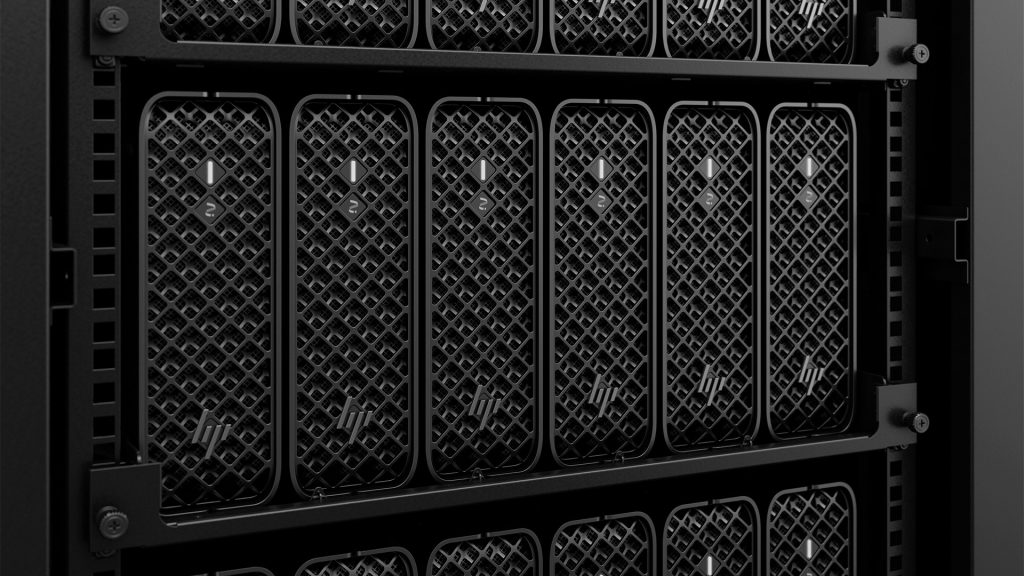

How Intel-based HP Z Workstations, shared compute resources and cloud services can create a connected, flexible engineering environment for modern product development.
Product development rarely happens in one place these days. An engineer might spend the morning refining a 3D CAD model, the afternoon running a complex simulation, then turn to an AI agent to explore new design possibilities. Each task brings different computing demands, and a desktop workstation may not always be the best way to handle them all.
That’s why more organizations are looking at how to connect desktop workstations, shared compute infrastructure and cloud services into one joined-up engineering environment.
Intel-based HP Z Workstations provide a range of options, from compact systems to expandable towers. By locating these workstations in a datacenter rather than on engineers’ desks, firms can centralize hardware management and bring workstations closer to shared storage, servers and other compute resources. Cloud services can extend this environment when additional capacity or specialist tools are required.
Network connectivity is fundamental
Bringing these resources together is only part of the picture. Engineers also need to move data between applications, storage and compute resources quickly and reliably. CAD parts and assemblies need to synchronize with product lifecycle management (PLM) systems, while simulation models may be sent to external compute resources, with results returned for analysis and visualization. AI tools add another layer, linking desktop CAD applications with cloud services to accelerate design iterations and automate repetitive tasks.
When workstations, storage and compute resources are spread across different locations, those data transfers can quickly become a bottleneck. A workstation might have plenty of processing power, but that performance is less useful if engineers are left waiting for files to load or results to arrive.
That makes network performance an important part of workstation planning.
The latest Intel-based HP Z Workstations offer 2.5 GbE connectivity, with up to 10 GbE available on selected models and configurations. However, faster workstation networking is only part of the solution. Switches, storage systems and network uplinks all need enough capacity to handle the traffic, particularly when multiple engineers are working with large datasets at the same time.
Bringing engineering compute together in the datacenter
One way to simplify this is to bring workstations and their supporting infrastructure together in an on-premise datacenter or hosted private environment.
With workstations located alongside servers, shared storage, PLM systems and high-performance computing (HPC) clusters, engineers can access the data and resources they need without routinely having to move large datasets across office networks. It also gives IT teams a more centralized way to manage the hardware supporting product development.
Importantly, centralizing the hardware doesn’t need to change the experience. Each engineer can have a dedicated physical workstation configured for their applications, with remote access provided through HP Z Remote Graphics Software (RGS). Rather than routinely transferring entire datasets to a local machine, the designer or engineer receives a stream of pixels from the workstation, allowing them to interact with their applications remotely.
This approach means working files can be kept within managed infrastructure while giving engineers the flexibility to work from different locations. It can also simplify access to the servers, storage and other compute resources that support their day-to-day work.
Choosing workstations for the datacenter
Moving workstations into a datacenter doesn’t mean switching to a different class of hardware. The same Intel-based HP Z Workstations that engineers would typically use at their desks can be deployed in a datacenter or hosted private environment. When configured with the HP Remote System Controller, they also provide server-grade out-of-band management, so IT teams can monitor and manage entire fleets of workstations remotely.
HP Z Workstations cover a range of engineering requirements, with rack deployment options depending on the model and mounting solution. For organizations looking to maximize rack density, the HP Z2 Mini G1i offers a compact option, supporting up to six units in a 5U rack configuration. Built around Intel Core Ultra processors, it is well suited to CAD-centric workflows, including simulation-led and generative design, and other engineering applications that benefit from high single-core performance.
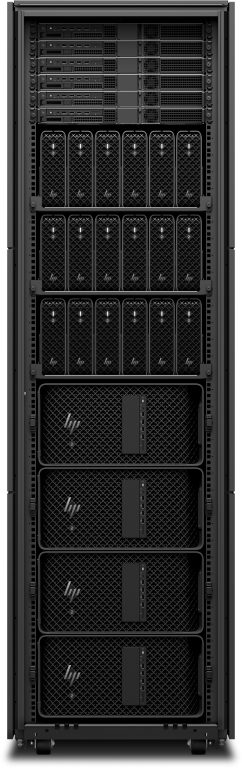
For more demanding applications such as computational fluid dynamics (CFD) and finite element analysis (FEA), which can benefit from more CPU cores, greater memory capacity and bandwidth, or multiple high-end GPUs, particularly for running larger AI models locally, the Intel Xeon-based HP Z4 G6i and HP Z8 Fury G6i workstations provide higher-end alternatives.
The right choice depends on the applications being used, the complexity of the datasets and where the performance bottlenecks occur. A designer working mainly with individual parts and assemblies will have very different requirements to an engineer running large simulations or developing AI applications. Matching the workstation to the workload helps deliver the performance required without paying for capacity that may rarely be used.
Learn more in this accompanying article.
Extending the environment to the cloud
Centralizing engineering resources doesn’t mean everything must stay on premise. Local AI can handle many everyday tasks, but cloud services provide access to larger, more capable frontier models, add capacity when workloads outgrow available resources, or when teams need specialist tools.
However, moving large engineering datasets to and from the cloud can take time and consume network capacity. Performance depends not only on the cloud service itself, but also on the amount of data being transferred and the available bandwidth.
This is where a hosted private environment can offer an advantage. By locating workstations in a well-connected datacenter, organizations can access high-capacity connections to public cloud services, potentially offering much greater bandwidth than a typical business internet connection. This can make it easier to combine dedicated workstation resources with cloud-based AI, simulation and other compute-intensive workloads.
Ultimately, the right balance depends on the demands of each workload, with performance, cost, scalability and control all influencing where it runs.
Making better use of GPU resources
GPUs are another consideration, particularly as engineering teams expand visualization and AI work.
Some engineering and AI workloads require substantial GPU power, but not every engineer needs dedicated access to it all the time. Running AI models locally is a good example, as larger models can demand significant GPU memory. Equipping every workstation with a high-end GPU can be expensive, while the larger Intel Xeon-based towers needed to accommodate powerful graphics configurations can reduce rack density compared with compact systems such as the HP Z2 Mini G1i.
Sharing GPU resources can offer another way forward. HP Z Boost allows compatible client systems to access GPUs in other HP Z Workstations across a network. Designed for low-latency LAN connections, it is particularly well suited to workstations racked together in a datacenter.
The HP Z8 Fury G6i is particularly well suited to this role, as it can accommodate up to four high-end GPUs. Through HP Z Boost, this capacity can give engineers access to additional GPU resources for supported local AI inference, rendering and other accelerated workloads, without requiring every workstation to have its own maximum GPU configuration.
For organizations with varied workloads, that flexibility can help make better use of available hardware. Instead of equipping every user for occasional peak demand, IT teams can provide access to additional resources where and when they’re needed.
A connected foundation for engineering
Performance matters, but it’s only part of the picture. Product design and manufacturing firms also need to consider intellectual property, customer confidentiality and regulatory obligations when deciding where workloads run and how engineers access them.
Centralizing workstations and engineering data can help IT teams apply consistent management and security policies, provided the supporting infrastructure is configured appropriately. Cloud services can add capacity and specialist capabilities, while on-premise systems continue to support established workflows and requirements for data control.
Ultimately, the modern workstation is about more than the machine on an engineer’s desk. It’s part of a wider environment that brings together dedicated workstations, shared storage, PLM systems, servers and HPC clusters, with local AI and shared GPU resources close to the data, and cloud services providing access to frontier models and extra capacity when needed.
When these elements work together, organizations can give engineers responsive performance for interactive tasks, more efficient access to data and the computing capacity to tackle demanding workloads. At the same time, IT teams can manage resources more centrally and maintain greater control over the infrastructure supporting product development.
The result is a connected engineering environment that can adapt as workloads change, helping teams work more efficiently without losing sight of performance, scalability or control.