
Creo 13 gives glimpses of PTC’s AI plans for its powerhouse CAD product, with more AI tools set to arrive before the end of the year
2026 saw a return to stability for PTC following 2025’s sell off of its IoT platform ThingWorx and some dramatic rumours of a takeover by Autodesk. However with things back on track, the launch of PTC Creo 13 has had us looking to the future, mot the past.
From where we left off with Creo 12, some 150 elements like simulation, composites, ECAD and wider productivity updates have all progressed, but the big news is that Creo has noticeable AI tools that users can interact with, on top of the under the hood performance it has enabled since the last release.
Speaking to Brian Thompson, division VP and GM for the CAD segment at PTC last year, he told us that their customers don’t want AI ‘for the sake of AI’, and that the PTC strategy is to use AI when it can improve the user experience and create customer value across engineering, manufacturing and service. Seemingly that time is now; Advise, Assist and Automate form Creo’s ‘Triple A’ of AI tools for designers and engineers, with the first looks all positive for users.

Paul Sagar, PTC VP of product management, ran us through the three tools.
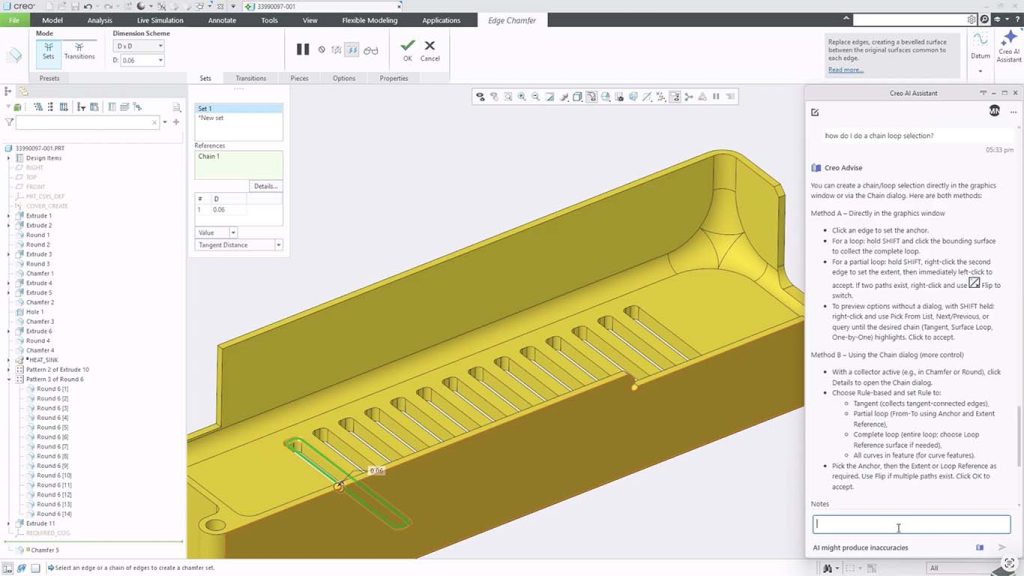
Advise is the helper, guiding users through the day-to-day work, how to use a feature, troubleshoot a problem, or find a command if they’ve just shifted from using a different CAD package.
It’s straightforward and should make life a little easier and more productive for Creo 13 users, drawing on the 40 plus years’ worth of knowledge and best practices that Creo has built up, plus any other open standards, rules and legislations.
It’s not going to set the world alight, but that’s quite by intention as it’s meant to be so simple you don’t need to think about it being AI. It’s available to all users of Creo 13 and takes the form of a chatbot UI.
Then there’s Assist, where AI can actually start to understand a little bit more about what the user is doing, by understanding what’s happening in the connect of Creo. It can understand the model you’re working on, extracting information from it to then offer assistance or input based on that data. Still in Beta, Assist should reach users in late autumn.
An example Sagar gives is a model of an engine, asking Assist to create a report from it that lists every single round, its dimensions and radius. The task would take a couple of hours for a human but takes only a few seconds for Assist as it understands the context and can pull all the information out and present it.
From this, the user can add some further design intent. Asking, ‘I would like to create a top-level parameter in my assembly that controls every single radius of the same value’, the user can change this in one location and Assist will update all of those radii.
If the user were to ask the AI how to go about doing this themselves, rather than in the Advice case of giving a generic answer, Assist, because it understands context, gives the exact steps needed through every single piece.
Automate takes this all even further. Still in Alpha, it is still expected to reach users before end of year as its developers add robustness to the AI, reduce the chance of hallucinations and allow it to produce accurate, reproducible answers.
A simple demo of Automate features an exhaust pipe with a single inlet and two outlets. The user can ask Automate what the best ratio is for flow, acoustics or other factors, and it will optimise the model. The first thing it does is explain what changes it will make, then ask if you want to proceed.
The optimised CAD model is then built in a sandbox environment, which protects the original design, giving the user the ability to review the changes the AI made with a graphical representation of the before and after.
Full transparency is the key thing here, explains Sagar. “We’re letting the engineer make the decision,” he says. “We want to make sure that the human is always in the loop, that the human is well aware of everything that AI has done.” Proceeding and accepting moves you forward. Rejecting the design takes you straight back to where you were before you began.
These steps make for risk-free design exploration and are built on an existing add-on in Creo – Design Exploration – which allows users to try out multiple design explorations but doesn’t leave them with 15 different copies of an assembly that then need to be time-consumingly consolidated down into one. Instead, it uses ‘branches’ of the design tree, which allow users to switch between iterations quickly with low risk to messing up the file and giving the designer full control.
The further AI roadmap for Creo is quickly building steam. The next release will see not only a new naming convention and launch cycle – Creo 2027 is set to be announced before the end of the year, most likely at the PTC NEXT event in Barcelona, Spain this December – but further AI tools and abilities.
The Triple A additions are all considered and stable additions to what Creo already accomplishes as a CAD package. What lies over the horizon is likely more of the same, but don’t be surprised if there’s something a little more exotic added as PTC considers what the competition is announcing.