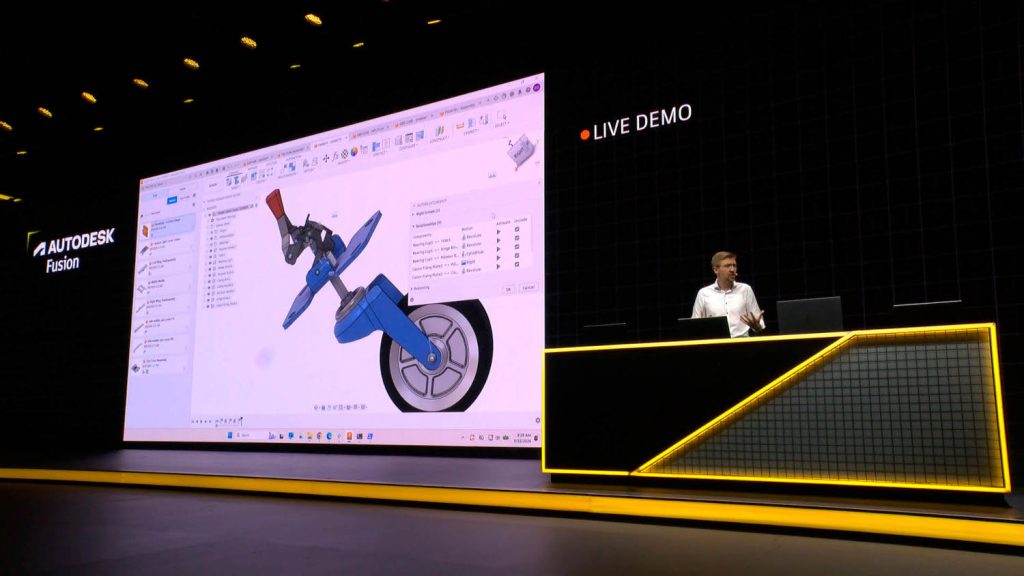

At Autodesk University Autodesk presented an AI ambition that goes beyond faster tools: a connected Assistant that decides how to solve tasks on your behalf. But as Greg Corke found on the Expo floor, there’s also a growing appetite for local AI, keeping data and costs firmly under control
Autodesk no longer just wants to sell you better software; it wants to do a lot of your work for you. At Autodesk University 2026, that ambition was presented as ‘Project Intelligence’, described by Autodesk CEO Andrew Anagnost during his keynote as a “connected brain at the centre that brings every data point, every decision, every discipline together – a brain that grows smarter as a project advances.”
Naturally, AI dominated the agenda. Almost every major announcement came wrapped in talk of agents, models and context. What set this AU apart from the previous two, however, was a shift from talk of time-saving features in individual CAD tools to a more ambitious AI proposition: an intelligent AI intended to turn a user’s stated intent into work they can review, refine, and use, without them having to navigate products, workflows, data and complex UIs. In other words, users state what they want, and Autodesk becomes the orchestrator calling on the relevant tools from its broad software ecosystem.
Autodesk Assistant goes agent-first
The headline announcement was that Autodesk Assistant is going solo. Anagnost explained that it will be available as a “standalone agent-first experience, one that reaches across products.”
Mike Haley, SVP research gave the rationale in the pre-event press briefing stating that it is “for work that doesn’t fit neatly inside a product like Revit or AutoCAD or Fusion.” The software is still in development and expected to launch next year.
Standalone Assistant is not a replacement for the Assistants already found inside Revit, AutoCAD, Fusion and others. In fact, Amy Bunszel, executive VP, AEC solutions, confi rmed that Autodesk will keep expanding the in-product versions.
The name doesn’t match the ambition. Autodesk Assistant sounds like a help pane, which is mostly what it was until it got its first AI injection last year. What was shown at AU 2026 is closer to an AI-powered operating environment that can spawn agents, reach across products, disciplines, datasets and organisations, and even generate its own user interface. That sounds less like an assistant and more like the beating heart of a platform — in Autodesk’s case, its industry clouds: Forma, Fusion and Flow.
Who is the Standalone Assistant for?
The core users of the Standalone Assistant, according to Bunszel, will be those following what Autodesk internally calls critical user journeys, “Things our customers are trying to do across products and across projects,” she said. These users will likely span both ends of the skill curve, from experienced operators to laypeople.
From a technology standpoint it’s an access layer over a mesh of components “Some of it is MCPs [Model Context Protocol], some of it is agents that we’re building, agents customers are bringing, cloud services we have on APS,” said Bunszel.
Project-aware, not prompt-driven
In recent months, it’s been hard to ignore the remarkable 3D-modelling experiments people are sharing with OpenAI’s GPT-6 Astra, driving tools like Blender and Rhino. Autodesk’s argument against the frontier labs is that generic chat is the wrong approach for design and that AI models powering Autodesk’s neural CAD directly reason in geometry, rather than speaking to an API about geometry.
“You can’t just rely on the large language models to solve problems,” said Haley. “
You’ve got to go much deeper,” because the context of design work is “not just a pile of text. It’s geometry. It’s engineering intent. It’s the project history. It’s the relationships behind the work.
That capability now has a name: Autodesk Context, introduced on stage by CTO Raji Arasu as something “not pulled from a prompt or a siloed data source” but built from the thousands of decisions a company makes. Critically, she said, “It’s not just about tracking what happened. It is why it happened.”
Autodesk Assistant is shaping up to be the thing that decides, on your behalf, how to solve a task — not just a faster way to use Revit, Fusion or AutoCAD Civil 3D
She described a familiar problem: six months after the project finishes, nobody can say why the wall moved. “The system may know what has changed, but why was that decision made? And too often that context is gone, locked in someone’s head.”
Context also captures the ‘when’. It’s not just a timestamp said Arasu, but “the state of the workflow at the moment that decision was made — the constraints, the data points, the people that led to making that decision.
“It’s a map of how information, people, decisions, and activities in the project relate to one another,” she said.
Arasu acknowledged that projects don’t live in a single system, so Autodesk has developed Assistant Builder (currently in preview) which extends the reach of Autodesk’s AI by letting organisations connect their own AI systems (and those of their partners) to Autodesk Assistant.
Another key layer in the stack is Autodesk AI Orchestrator, which as Arasu explained, is based on the premise that no single AI model is best for every job. It sits beneath Assistant and, according to Haley, determines “which AI model is best suited to the task based on accuracy, speed, security, and cost.” It constantly tests Autodesk’s own models, such as neural CAD, alongside frontier models, and routes work accordingly, “sometimes one model, sometimes several,” said Arasu.
Design work “is not just words. It’s geometry, schedules, materials, simulation,” said Arasu, needing specialised models “optimised for speed, precision, cost, and deterministic understanding.
“[Customers] should not have to evaluate every model or benchmark every workflow,” she said. “That is our job.” The pool currently spans Autodesk-built models, Claude, OpenAI and open-weight models.

Small is the point
Anagnost expanded on the Autodesk vs frontier model argument in his press Q&A. Large horizontal models “trained on billions and billions of parameters are a very expensive way to solve certain specific problems, especially when the specific problem has to be described in a highly constrained way. The models just burn through tokens like you can’t believe,” he said.
Autodesk’s own models “used to be called large,” he said. “They’re called medium to small now.” The orchestration layer in Autodesk Assistant is designed to take advantage of that. “These are very cheap to execute, you know, pennies relative to dollars,” he said.
Small is also better for speed and accuracy, he added. “Because it’s trained for a narrower problem, it generates at a higher level of accuracy probabilistically.”
Anagnost also explained that Autodesk is bringing in an open-weight model because it found the performance is just as good at certain problems as the best model coming from Claude.
Towards a single model
Neural CAD is Autodesk’s in-house AI design technology, designed to reason directly about 3D geometry and physics.
It’s not a single model, as Tonya Custis, senior director of AI research, explained, “Neural CAD is just the term that we use to talk about all of our generative models — primarily for geometry, design and manufacturing, and AEC.”
Individual models are already being used in Fusion, Revit, and Forma, typically as “one neural CAD model surrounded by other models.” The longer-term goal is consolidation:
“Eventually we’re working on how do we train one big model for all those things,” she said. “When you build a model that learns all the tasks at once, it’s better at all the tasks.”
Voice, sketch, and a simplified UI
Autodesk is exploring new ways to interact with its products. Its R&D team showed Project Quill, combining sketching, speech and AI: “Some things are very easy to sketch but hard to describe; some things are easy to describe but hard to sketch,” said an Autodesk spokesperson. “Combining those together lets people get to what they’re trying to express more quickly and easily.”
Users start from a rough napkin sketch, then circle something and say ‘make the door bigger’ or ‘add some solar panels here,’ before the design becomes a 3D object. Crucially it’s not a one-shot system – the user could iterate on it dozens of times.
Autodesk is also exploring ways to make existing tools easier to use and, in the future, Assistant may be able to generate UIs on the fly, suggesting there could be a shift from fixed software interfaces to ones that are task specific. “If you wanted a user interface to control Revit to make something very easy to do, you can ask for it, and it’ll generate that,” said Michelangelo Capraro, distinguished experience architect at Autodesk.
The Standalone Assistant demo
On stage Autodesk demonstrated how Standalone Assistant might operate in the future. It opened with a project manager “already behind” on emails, RFIs and issues, before Assistant surfaced the critical items across multiple projects “intelligently assembled by agents.”
On one residential project, a client requested more rentable area by moving a wall three feet. Rather than type, the project manager asked: “How will this change impact the schedule, and what are the downstream impacts?” Assistant responded with a Gantt chart that identified schedule hotspots.
The architect then asked it to “generate an LoD 300 apartment with walls and doors.” Assistant invoked an “industry foundation model trained specifically to understand and generate building geometry” using Building Layout Explorer to stream a 3D model in real time. It then fitted room layouts into every different shaped and sized unit across the building. This was presented as “minutes of work” instead of a day.
Next came an “agentic workflow” in Assistant Builder: “Run the slatted facade workflow using dimensions from this attached image.” Assistant extracted dimensions from a sketch and generated some metal brackets for the wooden slats.
The workflow then crossed products and industries. A design engineer in Fusion received the specification, Assistant found a similar bracket in the archive, updated it automatically, generated more than a thousand fascia options from images and then packaged everything back to the architect.
Anagnost’s summary got to the heart of Autodesk’s vision for Assistant: people should focus on the outcome, the problems they are trying to solve, rather than searching for the tools and capabilities needed to solve them.
The transparency challenge
Every firm that has experimented with frontier models knows the feeling: an impressive result, and no idea what it cost. To give customers more predictability, Anagnost says the plan is to amortise, “Some customers will overpay for something simple and underpay for something complex, and the average will work out to something that we can deploy at a reasonable margin,” he said in his press Q&A.
Of course, just because something is predictable does not mean it’s visible. Users of Adobe Creative Cloud, for example, know immediately how much a generative image will cost. Put to Bunszel if Autodesk might adopt a similar model, her answer was that it’s “very realistic”. Pushed on Autodesk giving customers reports that are granular enough to show who spent tokens and where, she said, “For the expensive features, there’ll probably be a rate table, so that people will know what happens when I push the button on these things.”
Routine AI, she said, should be included in subscription, with charges reserved for things “highly valuable, expensive to run.”
Beyond Assistant
Through Model Context Protocol (MCP), an emerging standard that lets external large language models (LLMs) interact with a range of software, the plumbing into Autodesk products is open.
Autodesk has developed its own MCP Servers for Revit, Fusion and others. There are also many others from third parties and, as Nvidia’s Sean Young pointed out in his AU presentation, there’s also the DIY route via AI coding, “As long as there’s an API, you can write your own,” he said. And he has done it repeatedly, “I’ve made MCP servers for a dozen different applications this way… anybody could do it.”
The significance is control: with your own MCPs you can build the workflow you want, and you can also move the expensive part onto your own hardware.
Taking the processing local
In the age of AI, design and engineering firms are paying close attention to the economics. Agentic workloads can break cloud pricing, said Young, “The agent can consume tokens a lot more quickly because the agent is spawning subagents. “
At a certain point the cost of tokens on the cloud exceeds what your IT budgets are,” he said.
Symetri’s Kevin Philips told DEVELOP3D that it is starting to become very attractive for AEC firms to buy hardware. He explained that the top 5% of developers could be spending as much as $10k a month on tokens, while other practices are not allowed to use frontier models, full stop.
In public Autodesk appears relaxed about that prospect. When DEVELOP3D talked to Bunszel about firms running open-weight models locally, with no cloud costs, she replied. “That’s great.” She agreed that firms may end up handling parts of a workflow themselves, while relying on Autodesk for others. Running open-weight models on-premise, on servers is one approach, but at AU, all three major workstation vendors were demoing truly local alternatives.
Revit, MCP and LLM – all on one PC
HP’s partnership with Perplexity, announced alongside the new ZBook Ultra G3a mobile workstation, was the most accessible example of local AI we saw at AU.
The key is a combination of pre-installed software and 192 GB of system memory, of which a massive 160 GB can be allocated to the integrated GPU thanks to the systemon- chip design of the AMD Ryzen AI Max Pro processor. That’s enough GPU memory to run the entire CAD and AI software stack on a single machine, something that typically can’t be done on any other mobile workstation.
Perplexity acts as the orchestrator, with the demo showing Perplexity’s own LLM, a post-trained version of Qwen, driving the official Revit 2027 MCP server, all on one machine — and, as Perplexity’s Daniela Miranda- Smith explained, “if you’re using local models, the cost is really just electricity.”
At the other end of the spectrum, Greg Schleusner, former director of design technology at HOK and regular presenter at AEC Magazine’s NXT BLD, has been experimenting with the HP ZBook Ultra G3a.
Moving beyond a single MCP connection into Revit, Schleusner has been running “very large models or smaller models working together on the device” to handle real production workflows. This includes an LLM to set up Revit projects, machine-learning-driven real-time clash detection, and an image model that checks room contents against requirements.
“If your concern is protecting your data from going to the outside world, then looking to a local piece of hardware, a local device is important,” he said.
Autonomous modelling
On the Dell stand, Nvidia showed autonomous modelling for Revit and Fusion, using a Dell Precision laptop connected via Ethernet to a Dell Pro Max with GB10 – a tiny desktop device powered by the Nvidia GB10 Grace Blackwell ‘superchip’, which combines Nvidia’s Arm-based Grace CPU and Blackwell GPU on one piece of silicon.
Revit and Fusion, along with custom MCP servers, ran on the laptop, while Qwen3.6-27B, an open weight LLM, ran on the GB10. The Revit demo showed how a third-party MCP could be used to model a basic building from a prompt. It was more proof of concept than practical solution, but an important point was made: fi rms can fi ne-tune open-weight models using their own Revit data to get better results, something you can’t do with a frontier model.
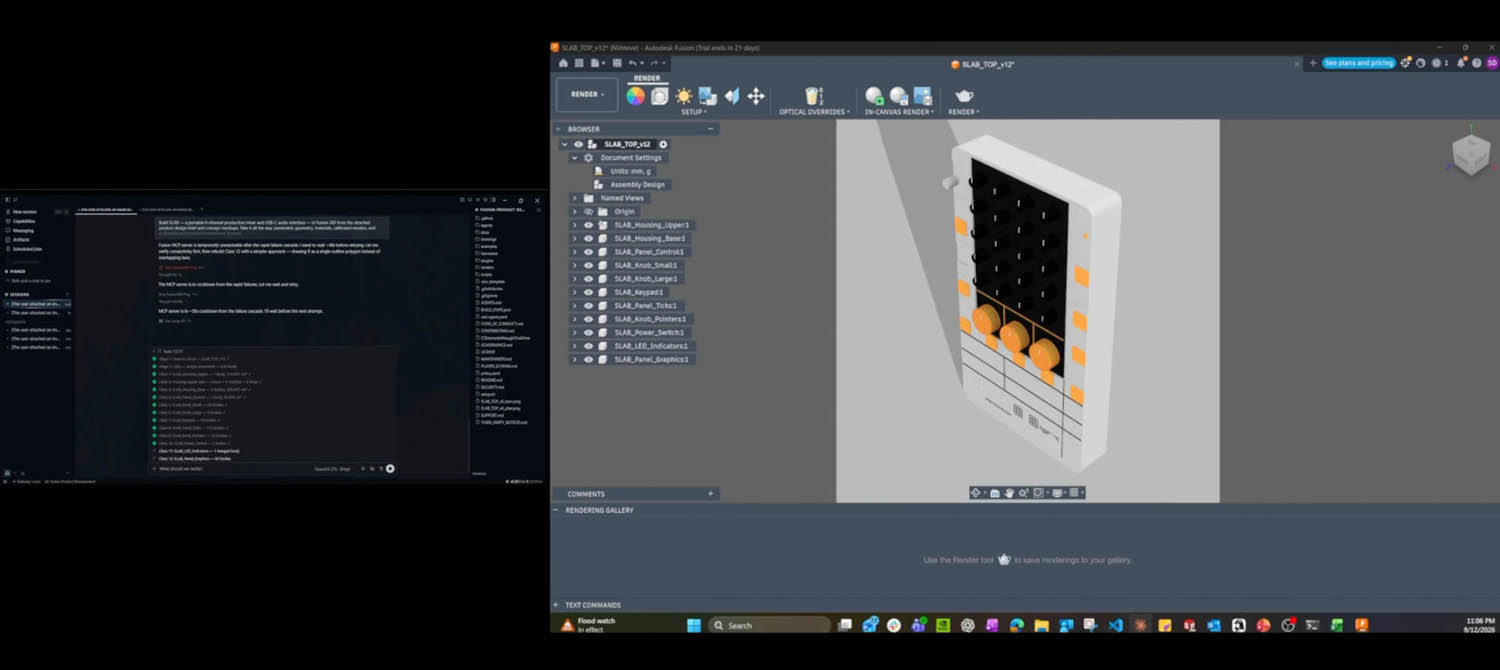
In contrast, the Fusion demo was one of the most striking things we saw all week, using multiple agents to model and refine.
The agents were orchestrated through the Hermes harness from Nous Research, which supports MCP, and unlike Claude Desktop, can connect to any model, in this case the local LLM on the GB10.
The thing that stood out was the use of multiple agents and feedback loops:
1) The user fi rst provides a prompt with a product design brief and two concept images. A project manager agent reads the brief, analyses the concept images, and breaks the project into individual tasks, assigning each stage to a specialist subagent.
2) A CAD subagent equipped with purpose-built engineering skills creates the model in Fusion’s Design workspace, organising components and applying initial materials and properties. The geometry created is verified against the design requirements, checking dimensions before handing it off to the visualisation subagent.
3) A visualisation subagent sets camera position, lighting, and render properties, then compares the resulting render against the original concept images. It automatically adjusts materials, properties, and scene settings in a continuous loop to match the concept images as closely as possible. Once approved, the model is then passed off to the drawing subagent.
4) A drawing subagent produces 2D engineering drawings and a parts list derived from the modelled assembly, checking views, dimensions, annotations, and list completeness.
5) The project-manager agent reviews the outputs.
This was just a demo, but consistent with Young’s account of recursive agent work. In his AU presentation he described how an agent could read the design requirements for a product, model the geometry, then run two different types of FEA simulations at the same time. If there’s a problem with one of the simulations the agent loops back to correct the geometry until it gets it right.
Accessible AI
Lenovo’s demo was the simplest, but arguably the most relevant to the average fi rm as it does not require investment in hardware. It showed a custom agentic front end to AutoCAD Civil 3D making cut and fi ll volume calculations far faster and simpler. The remarkable part is that it ran on current hardware — a Lenovo ThinkStation Ultra with a 16 GB Intel Arc Pro B50, a class of GPU many firms already have in their workstation. Lenovo explained that different agents could reside on different workstations across the network and be called upon by individual users as required.
Licensing: the elephant in the room
Running AI locally raises real questions about licensing and business models. If a firm builds agentic workflows around workstations or on-premise servers, with no process touching Autodesk’s cloud services, how might this impact Autodesk’s revenue?
For example, Autodesk offers the Revit Automation API through Autodesk Platform Services (APS), allowing the Revit engine to run in the cloud and create, extract and modify Revit data without a local installation. If an agent handles all of this locally instead, Autodesk could potentially miss out on that usage-based cloud revenue stream entirely.
There could also be an impact on licensed-seats sold. If agents end up taking over bulk modelling, querying, and documentation work that previously required people at seats, a firm may simply need fewer Revit licences to do the same volume of work.
Agentic AI workflows could even extend beyond a single application. In his AU presentation Young described agents running “an unlimited number of applications concurrently” via subagents, each driving an application through MCP with no UI interaction at all — the agent “doesn’t need to see the viewport.” It’s effectively a headless API call.
When asked about licensing and MCP, Autodesk told DEVELOP3D that customers are able to run multiple Revit instances on a single workstation, but the Revit instance must be properly licensed, and the users must be signed in. It also confirmed that its public MCP enables customers to create agent workflows for their own internal business purposes, but developers looking to build commercial applications can use APS.
That should be reassuring for firms looking to use Autodesk’s official MCP to automate internal workflows, although the position may be less clear when thirdparty MCPs are involved. And with agentic technology developing so rapidly, firms should nevertheless build local AI workflows with their eyes open. Autodesk’s licensing terms may appear to accommodate these workflows today, but that does not mean they will necessarily do so in the future. If agentic AI begins to significantly reduce the number of seats required or bypass usage-based services, Autodesk could have a strong commercial incentive to revisit those terms.
Conclusion
If there’s one takeaway from AU 2026, it’s that Autodesk is shifting its value proposition from tools to outcomes. Assistant is shaping up to be the thing that decides, on your behalf, how to solve a task — not just a faster way to use Revit, Fusion or AutoCAD Civil 3D.
But Autodesk is chasing that ambition against a moving target. As we’ve seen recently with OpenAI’s GPT-6 Astra, frontier models have overnight become very proficient at modelling, and that will only get better. And, as Nvidia demonstrated on the Expo floor, modelling can also go fully local, with the added appeal that firms can train open-weight models on their own data while retaining full control over their IP and costs.
Modelling, though, is an isolated process. Autodesk’s real bet is on context — knowing where to pull data from across project decisions, disciplines and history, and stitching that into something coherent. That’s harder to replicate than generating geometry, and it’s where Autodesk is trying to make itself indispensable.
The big question is whether customers actually want that from Autodesk, especially when they don’t really know how much it will cost now and especially in the future. As we have already seen, some firms may prefer to build their own in-house stack — their own workflows, their own design automation, their own connections between applications — keeping data and costs firmly under their own control. But even that route isn’t free of uncertainty. If your new workflows aren’t properly formed, how can you predict how many GPUs you might need, or even if current licensing costs will remain?
The good news is that, for now, Autodesk has only shared its vision. The next-generation Assistant isn’t expected until sometime next year, which gives design and engineering firms time to work out the best approach. However, with AI changing on a weekly basis, it may be the hardest time yet to be in charge of technology strategy at a design or engineering firm.
What new AI capabilities are coming to Fusion?
Autodesk announced several new AI capabilities coming to Fusion to help automate repetitive work, from rebuilding geometry and assembling components, to confi guring products and preparing manufacturing processes.
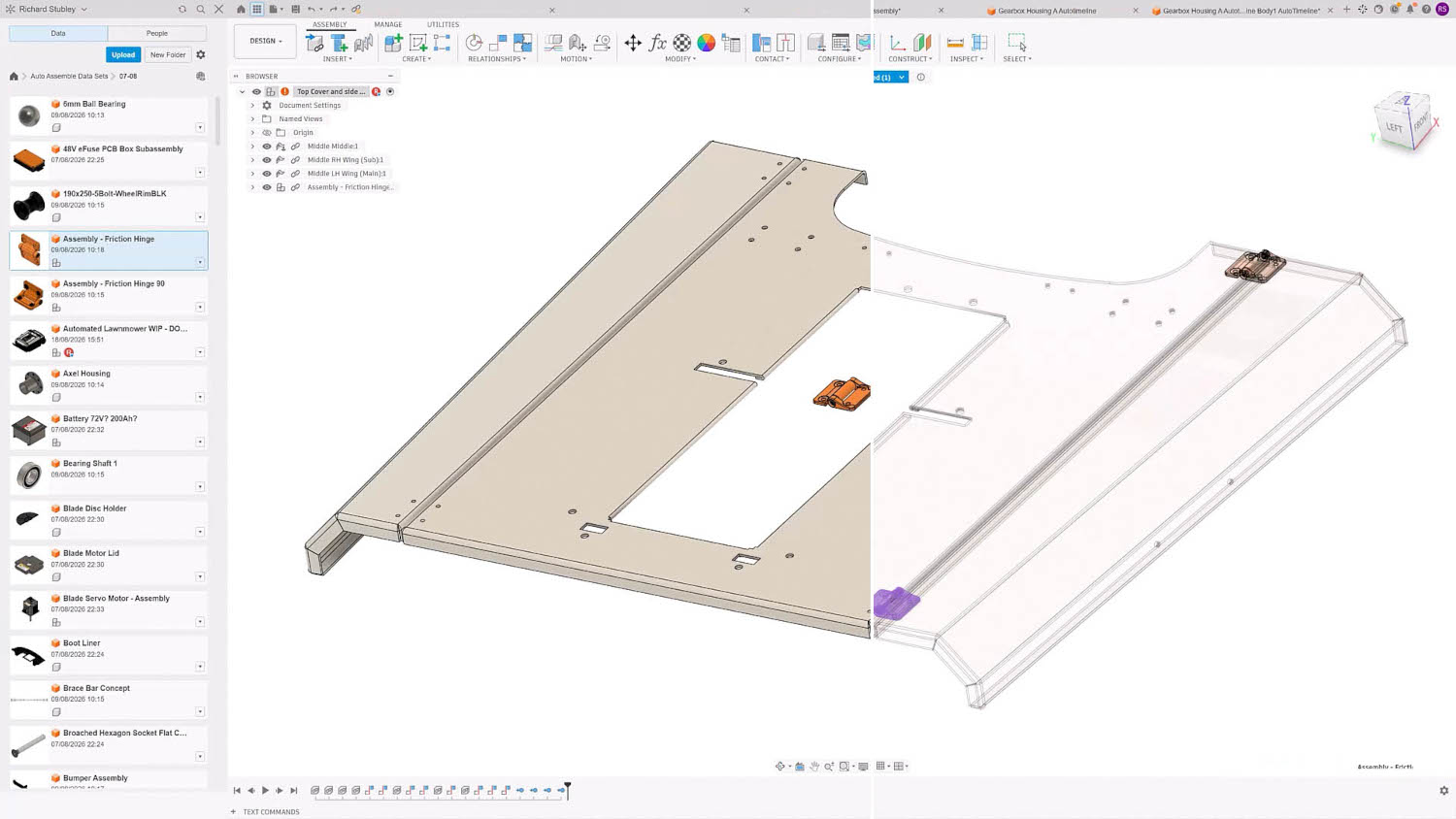
AutoTimeline is a feature recognition tool that converts imported geometry into editable parametric parts, or, as Autodesk’s Richard Stubley put it, “rebuilding the parametric DNA of a model”.
In short, it reverse engineers the recipe for the geometry, to give users far greater control over edits. It should appeal to teams working with suppliers and contractors or migrating from other CAD systems.
AutoAssemble is designed to make it easier to move from imported components to workable assemblies. It uses AI to recognise components, predict where they belong, and then automatically create the appropriate assembly relationships.
Autodesk Assistant will be able to help users create hundreds of Fusion product configurations through conversational input. Users describe product requirements in natural language, and Assistant builds the configuration logic needed to generate valid variants.
Assistant will also help teams find and reuse existing engineering data rather than recreate it. It searches company design libraries using geometry and metadata, identifies released alternatives, surfaces active change orders, and helps replace components when reuse is the better path.
Find Similar introduces AIpowered part discovery and reuse in Fusion. Industry foundation models identify similar components beyond part-number searches or basic geometry comparison, helping users find alternatives that may already exist within available design data.
AI-generated CAM programming is also coming to Fusion, helping teams automate machine setup, toolpath generation, and production preparation workflows. Rather than manually repeating the same processes for every job, the idea is that teams can create reusable manufacturing automations.
Inventor meanwhile becomes the first Fusion Connected Client, helping to better connect engineering and data, making it easier for teams to connect desktop engineering workflows in Inventor with cloud-based data and processes in Fusion that support the broader product lifecycle.
This article first appeared in DEVELOP3D Magazine
DEVELOP3D is a publication dedicated to product design + development, from concept to manufacture and the technologies behind it all.
To receive the physical publication or digital issue free, as well as exclusive news and offers, subscribe to DEVELOP3D Magazine here