
Nvidia’s new workstation-class GPUs deliver huge gains in AI, ray tracing, and memory, redefining workstation performance, multitasking, and professional visualisation workflows for demanding users, writes Greg Corke
Given how much GPUs have evolved over the years, they really need a new name. The term “Graphics Processing Unit” simply doesn’t cut it anymore. Today’s workstation-class GPUs do far more than display pixels or accelerate 3D viewports — they now handle massive computational workloads, including ray trace rendering, simulation, reality modelling, and, of course AI. These tasks place huge demands on the cards, which require raw compute power, large amounts of superfast memory, and efficient cooling, all while maintaining stability for hours, even days.
Nvidia’s new RTX Pro Blackwell family delivers exactly that. Compared to the previous Ada generation, the new workstation cards promise major gains, particularly in ray tracing and AI workloads, thanks to fourth-generation RT Cores, fifth-generation Tensor Cores, and faster, higher-capacity GDDR7 memory.
They also introduce support for new software technologies, most notably Nvidia DLSS 4.0, which uses AI to boost frame rates in supported real-time applications.
This article is part of DEVELOP3D’s 2026 Workstation Special report
The new ‘Pro’ generation
Ever since Nvidia retired the Quadro brand, distinguishing professional workstation GPUs from consumer-focused GeForce cards has become more difficult. With Blackwell, Nvidia aims to address this by adding a clear “Pro” suffix to its workstation lineup.
So far, seven RTX Pro Blackwell desktop workstation boards have been announced, replacing the Ada generation across the range. These span from the super high-end RTX Pro 6000 Blackwell Workstation Edition down to the mainstream RTX Pro 2000 Blackwell (see table below for the full line up).
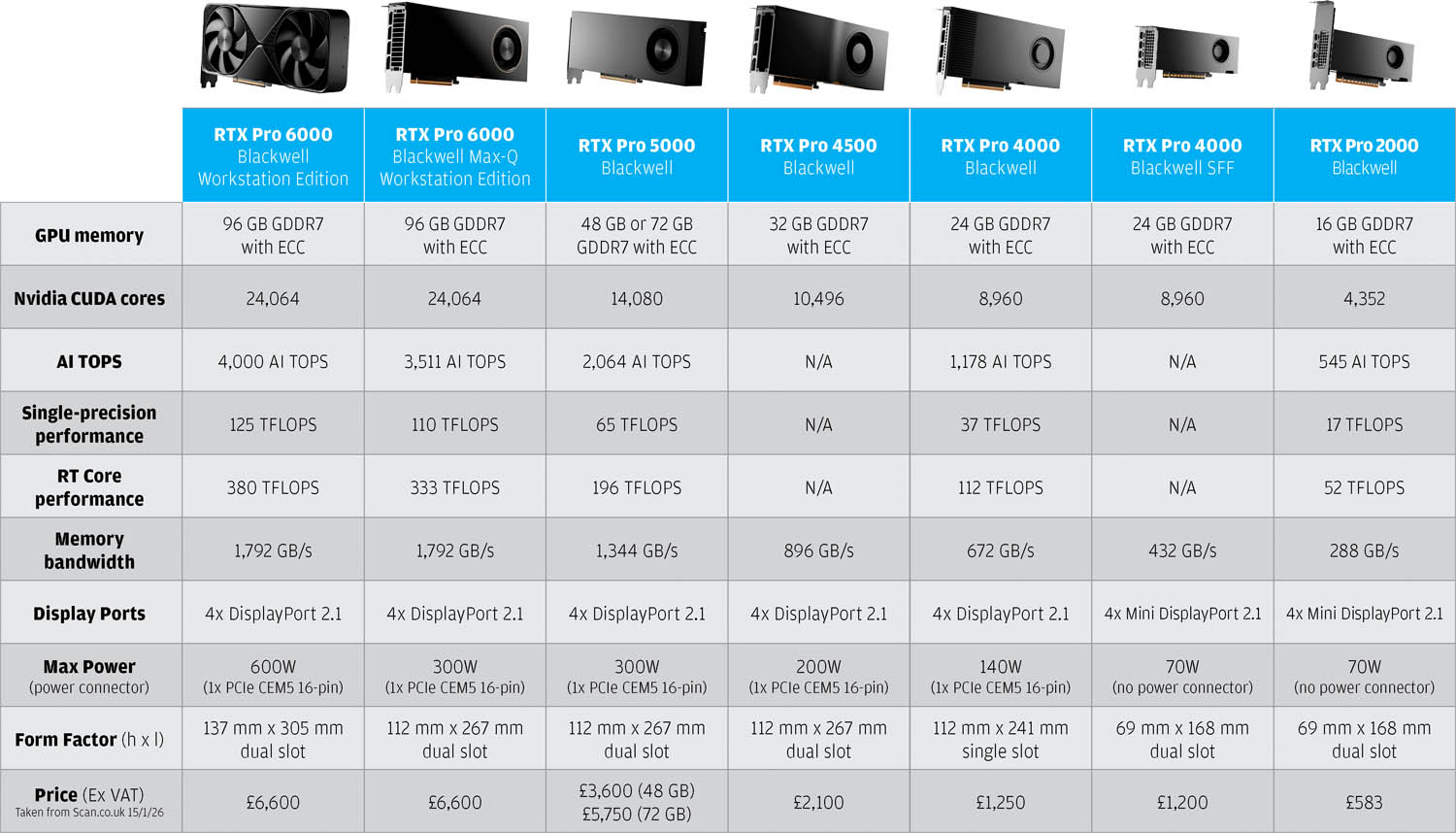
Meanwhile, for entry-level CAD and visualisation, Nvidia continues to offer the RTX A1000 and RTX A400, both based on the Ampere architecture, which is now two generations behind Blackwell. For this review, we got our hands on three of the new cards — the RTX Pro 2000, 4000, and 6000 — and evaluated their performance across several real-world design, visualisation, and AI workflows.
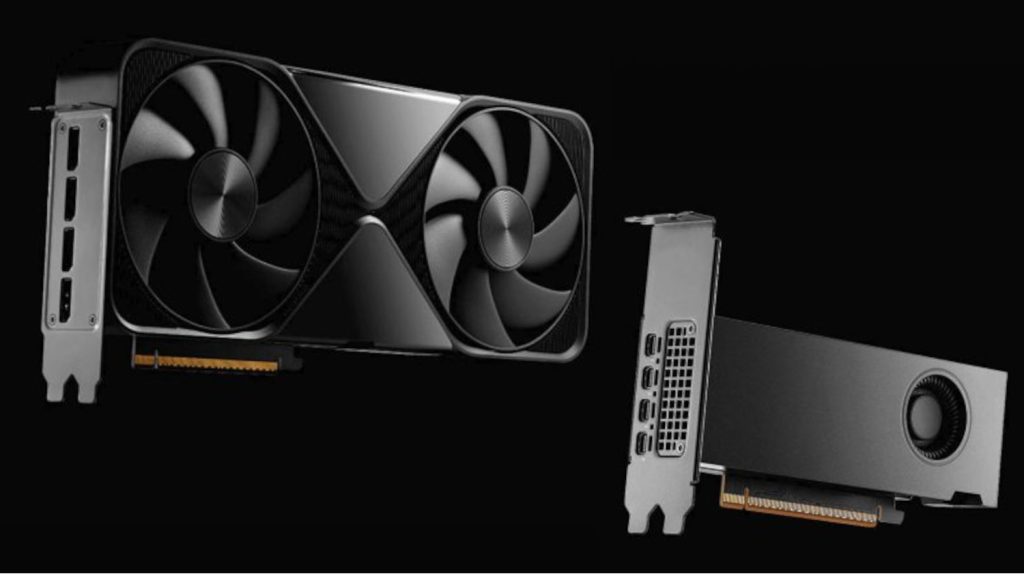
At the top of the range sits the RTX Pro 6000 Blackwell Workstation Edition, which Nvidia bills as the most powerful desktop GPU ever created. On paper, it even edges ahead of the 32 GB GeForce RTX 5090, offering higher single-precision performance along with faster AI and ray tracing capabilities. This marks a shift from Nvidia’s traditional approach, where workstation GPUs typically ran at lower clocks than their GeForce counterparts to prioritise power efficiency, thermals, and long-term reliability.
The Nvidia RTX Pro 6000 Blackwell Workstation Edition consumes a crazy amount of energy. It draws up to 600W, double that of its predecessor, the RTX 6000 Ada Generation (300W) and slightly more than the GeForce RTX 5090 (575W). While this enables extreme performance, it also limits where the card can be deployed. Some workstation chassis will struggle to accommodate its physical size, thermal output, and power requirements. Few will be able to support multiple cards, and even if they do, it will probably just be a maximum of two.
Unlike most professional GPUs, which use blower-style coolers to exhaust hot air directly out of the rear of the workstation, the RTX Pro 6000 Blackwell Workstation Edition adopts a different approach. It draws air in from beneath the card and vents it out of the top. This helps keep the GPU cooler under sustained heavy workloads, but it also raises internal chassis temperatures, making overall thermal management more complex. The issue becomes more pronounced if multiple GPUs are installed close together, as hot air from one card can be pulled straight into the next.
The good news is Nvidia also offers a “Max-Q” version of the RTX Pro 6000 Blackwell. This model uses a traditional blower-style fan and has a far more manageable 300W TDP, making it easier to integrate, particularly in multi-GPU workstations. We expect the Max-Q variant will be the default option from the major workstation OEMs.
Crucially, half the power does not mean half the performance. As with all processors, there are diminishing returns as power draw increases, and on paper the Max-Q version delivers only around 12% lower performance across CUDA, AI, and ray-tracing workloads compared with the full 600W model.
For the rest of the Pro Blackwell lineup, Nvidia has largely followed the blueprint of the Ada generation. In fact, many of the cards are visually identical. The RTX Pro 5000 (300W) and 4500 (200W) are dual-slot, full-length boards, while the RTX Pro 4000 (140W) is single slot. Meanwhile, the RTX Pro 4000 SFF and 2000 (both 70W) are low-profile, dual-slot cards designed for compact workstations such as the HP Z2 Mini and Lenovo ThinkStation P3 Ultra SFF (see review here). With an optional full height bracket, both cards will technically fit inside a standard tower, but it doesn’t make much sense to do that with the 4000 SFF. Despite having the same core specifications as the full-size 4000, its lower 70W TDP reduces performance, while the price remains the same.
All Blackwell cards feature 4 x DisplayPort 2.1 (or MiniDP 2.1 for SFF models), supporting very high-resolution displays at very high refresh rates — up to 8K (7,680 × 4,320) at 165 Hz. The RTX Pro 4000 and above require a PCIe CEM5 16-pin cable, though adapters are available for power supplies with older 6-pin and 8-pin PCIe connectors.
Memory matters
Memory is a major focus for RTX Pro Blackwell, both in terms of capacity and bandwidth. Larger VRAM allows massive datasets to stay entirely on the GPU, avoiding slow CPU–GPU transfers, compromises to workflows, or application crashes. We cover this in more detail here.
Meanwhile, high bandwidth GDDR7 memory helps ensure GPU cores remain fully fed and can operate at peak efficiency. Workloads where this is particularly important include AI training and inferencing (such as image and video generation or large language models), engineering simulation like computational fluid dynamics (CFD), and reality modelling tasks such as rendering 3D Gaussian Splats.
At the top end, both RTX Pro 6000 Blackwell GPUs double their VRAM from 48 GB on the previous RTX 6000 Ada generation to 96 GB and deliver an impressive 1,792 GB/s of memory bandwidth, nearly twice the 960 GB/s of the Ada generation. The RTX Pro 5000 also receives a massive upgrade, now available in 48 GB and 72 GB variants with 1,344 GB/s of bandwidth, up from 32 GB and 576 GB/s. Memory improvements are more modest on the lower-end cards, while the RTX 2000 remains at 16 GB, with no increase over its predecessor.
Performance
We tested the RTX Pro 6000, 4000 and 2000 Blackwell GPUs inside two Scan 3XS workstations. The RTX Pro 6000 in the AMD Threadripper Pro 9995WX-based machine (see here for full review) and the other two cards in the AMD Ryzen 9 9950X-based Scan 3XS GWPA1-R32 workstation, as reviewed in our 2025 Workstation Special Report.
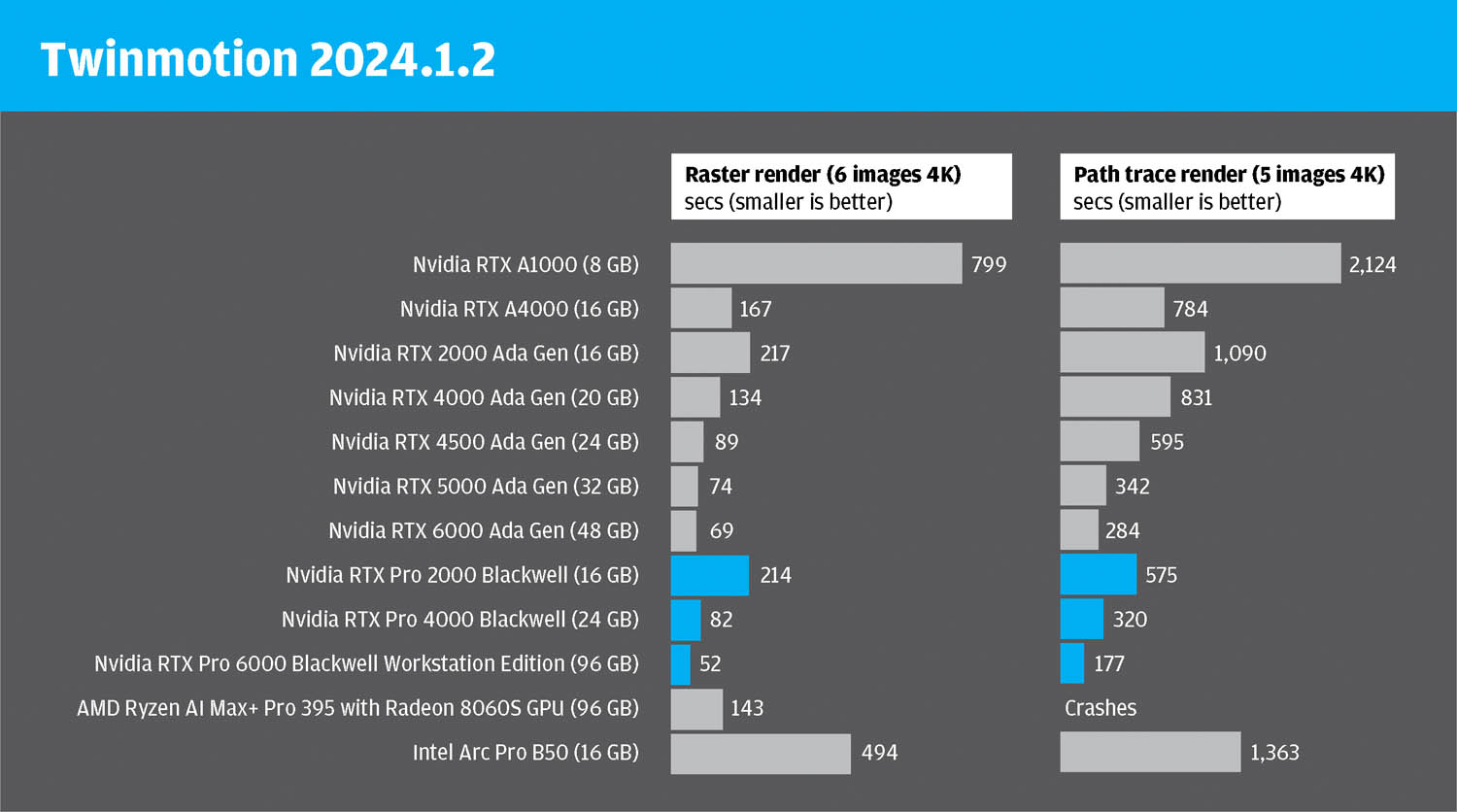
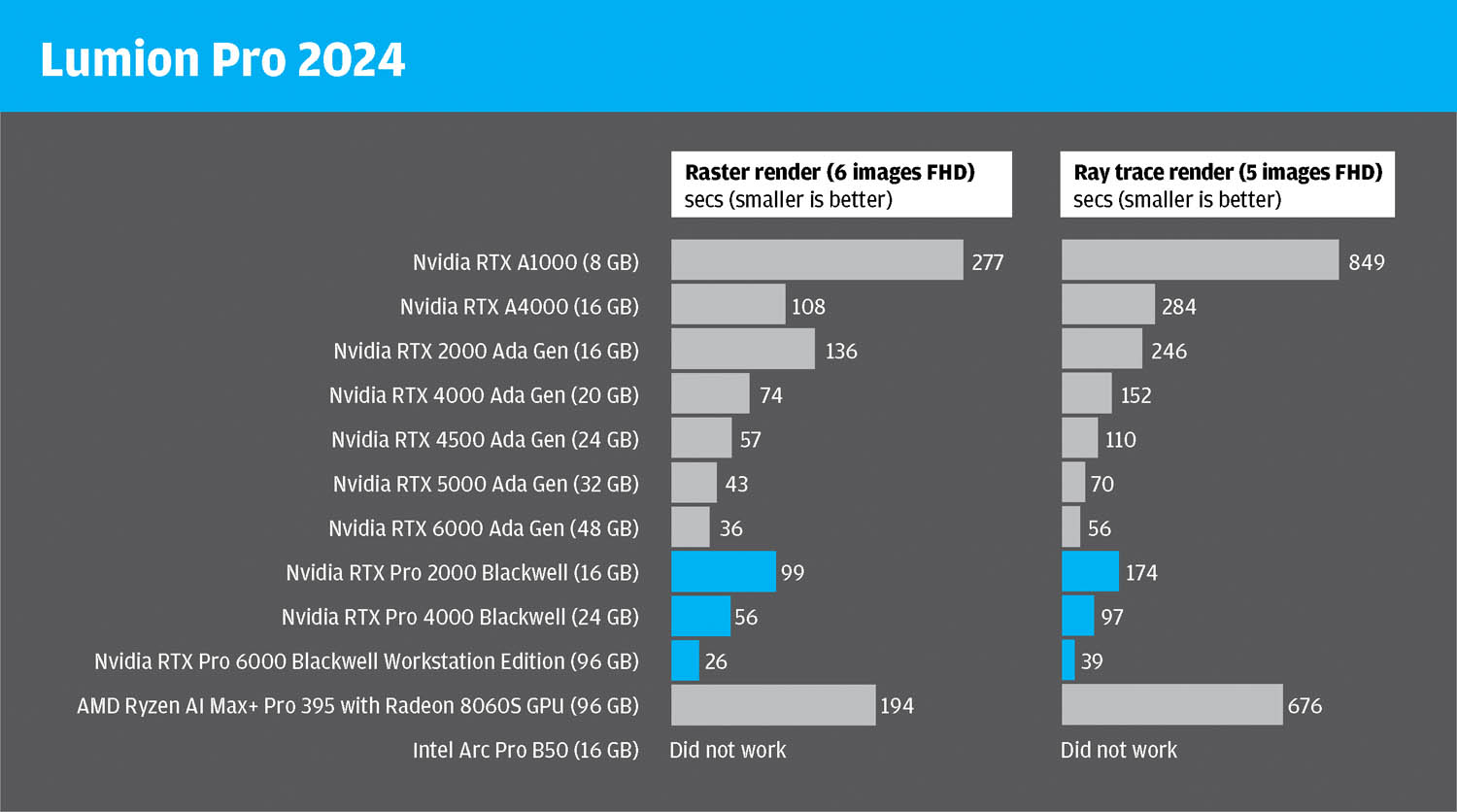
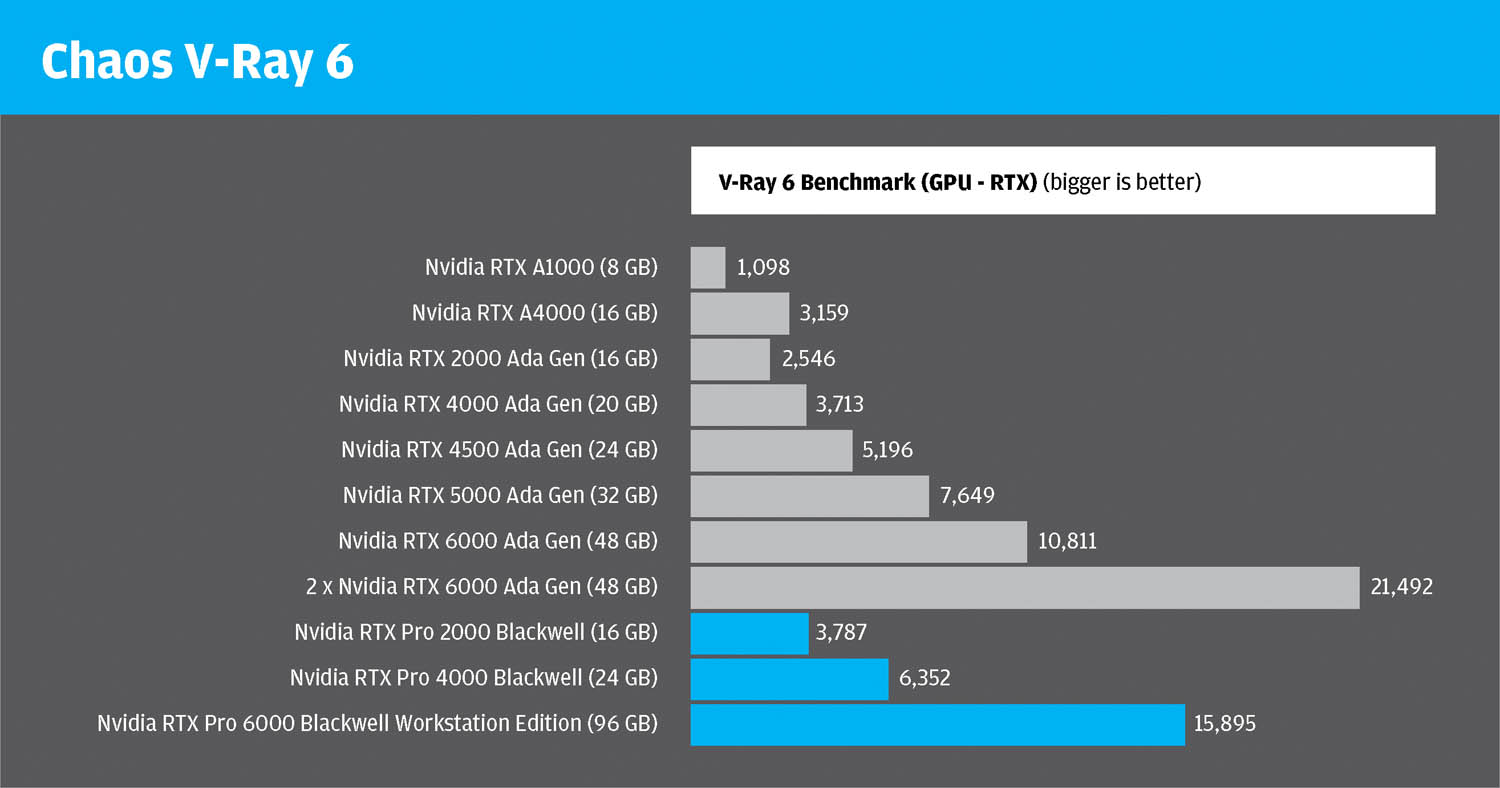
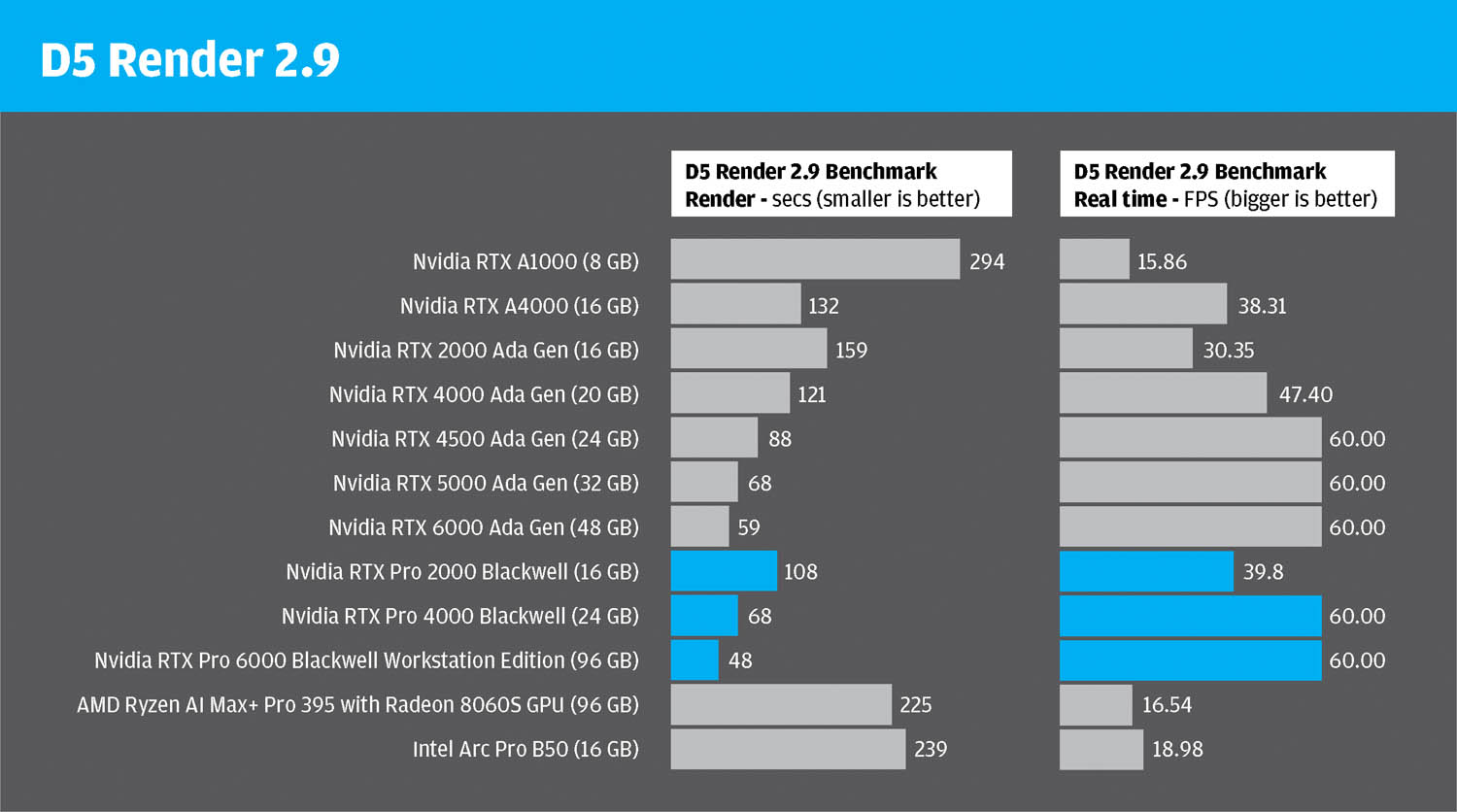
We used a spread of visualisation tools — D5 Render, Lumion, Twinmotion, V-Ray, and KeyShot — as well as the AI image generator Stable Diffusion. These results were compared with Nvidia’s previous generation Ada cards, older Nvidia Ampere GPUs, and entry-level professional GPUs from the competition, including the Intel Arc Pro B50 (see review here) and the AMD Ryzen AI Max Pro with integrated Radeon 8060S GPU (see here).
Performance gains of Blackwell were most pronounced in ray tracing and AI workflows. In Chaos V-Ray RTX rendering, the RTX Pro 6000 Blackwell was 1.47× faster, the RTX Pro 4000 1.71× faster, and the RTX Pro 2000 1.49× faster than their Ada-generation counterparts. In Twinmotion Path Tracing, the improvements were even more striking: the RTX 6000 was 1.6× faster, the RTX 4000 2.6× faster, and the RTX 2000 1.9× faster.

To put all of this into perspective, we tested the RTX Pro 6000 Blackwell in KeyShot 2025 using an enormous multi-room supermarket model supplied by Kesseböhmer Ladenbau (see figure 1). Simply loading the scene consumed 18.1 GB of GPU memory. The model contains 447 million triangles, 2,228 physical lights and 237,382 highly detailed parts, from chiller cabinets and cereal boxes to 3D fruit and vegetables. Remarkably, the GPU rendered the entire scene in just 69 seconds at 4K with 128 samples per pixel. Only a few years ago, tackling a model of this complexity on a single GPU would have been unthinkable.
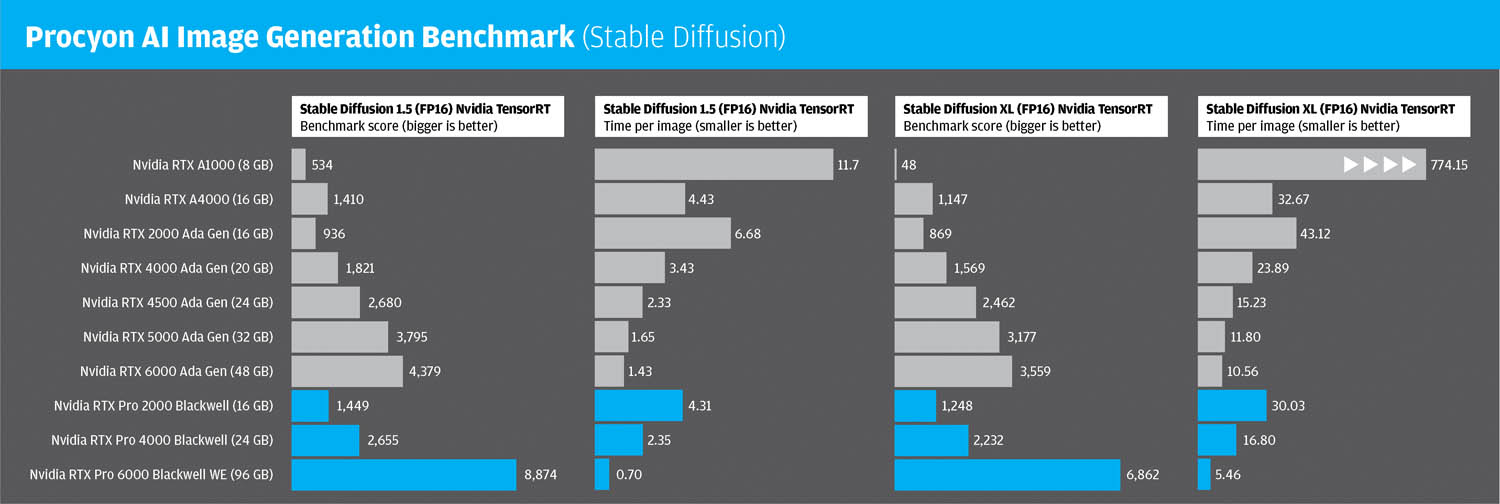
Of course, AI performance also receives a substantial boost, with the RTX Pro 6000 Blackwell Workstation Edition delivering the largest gains — not only from its 5th-generation Tensor cores, but also from its ability to feed those cores data more efficiently, thanks to significantly higher memory bandwidth.
In the Procyon AI Image Generation Benchmark, which uses Stable Diffusion 1.5 and XL, and leans heavily on the Tensor cores, it delivered a 1.93–2.03× performance increase over its Ada-gen equivalent, producing an image in SD XL every 5.46 seconds! Meanwhile, the RTX Pro 4000 was 1.42–1.46× faster, and the RTX Pro 2000 was 1.44–1.55× faster.
Pushing the 6000 to its limits With 96 GB of VRAM to play with we wanted to see just how far the RTX Pro 6000 Blackwell could be pushed. Rather than focusing on a single massive task — such as fine-tuning an LLM or generating high-resolution AI imagery — we set out to discover how many simultaneous workloads it could handle, before throwing in the towel.
We piled on job after job, eventually consuming 49 GB of GPU memory, yet nothing seemed to phase it. In the background we generated images in Stable Diffusion, ran renders in V-Ray, output videos in KeyShot all at the same time, and were still able to navigate a large scene in Twinmotion smoothly. The whole system remained very responsive.
Naturally, running everything in parallel meant each individual task took longer, but the key point here is that we barely noticed anything happening behind the scenes. For sheer multitasking firepower, it’s genuinely breathtaking.
AI frame generation
Blackwell isn’t just about throwing more compute power and memory at problems — it’s also about doing things smarter. With significantly improved AI Tensor core performance, all new Blackwell GPUs support more advanced neural rendering technologies, delivered through
DLSS 4.0. DLSS 3.0, which launched with the Ada Generation, introduced a technology called Frame Generation, designed to boost real-time performance.
With Frame Generation the GPU renders frames in the traditional way, but AI creates additional “in-between” frames to make motion smoother and increase frames per second (FPS). This gives the impression of much higher performance without the heavy computational cost of fully rendering every frame. With DLSS 3.0, one AI-generated frame was created for every traditionally rendered frame. With Blackwell and DLSS 4.0, up to three additional AI frames can now be generated.
In the world of visualisation software, DLSS 4.0 is currently supported in Twinmotion 2025 and D5 Render 3.0.
In D5 Render, our frame-recording software showed a huge uplift: on the RTX Pro 4000 Blackwell, frame rates in a colossal town scene (see figure 2) jumped from 11 FPS to 41 FPS — a near fourfold increase.
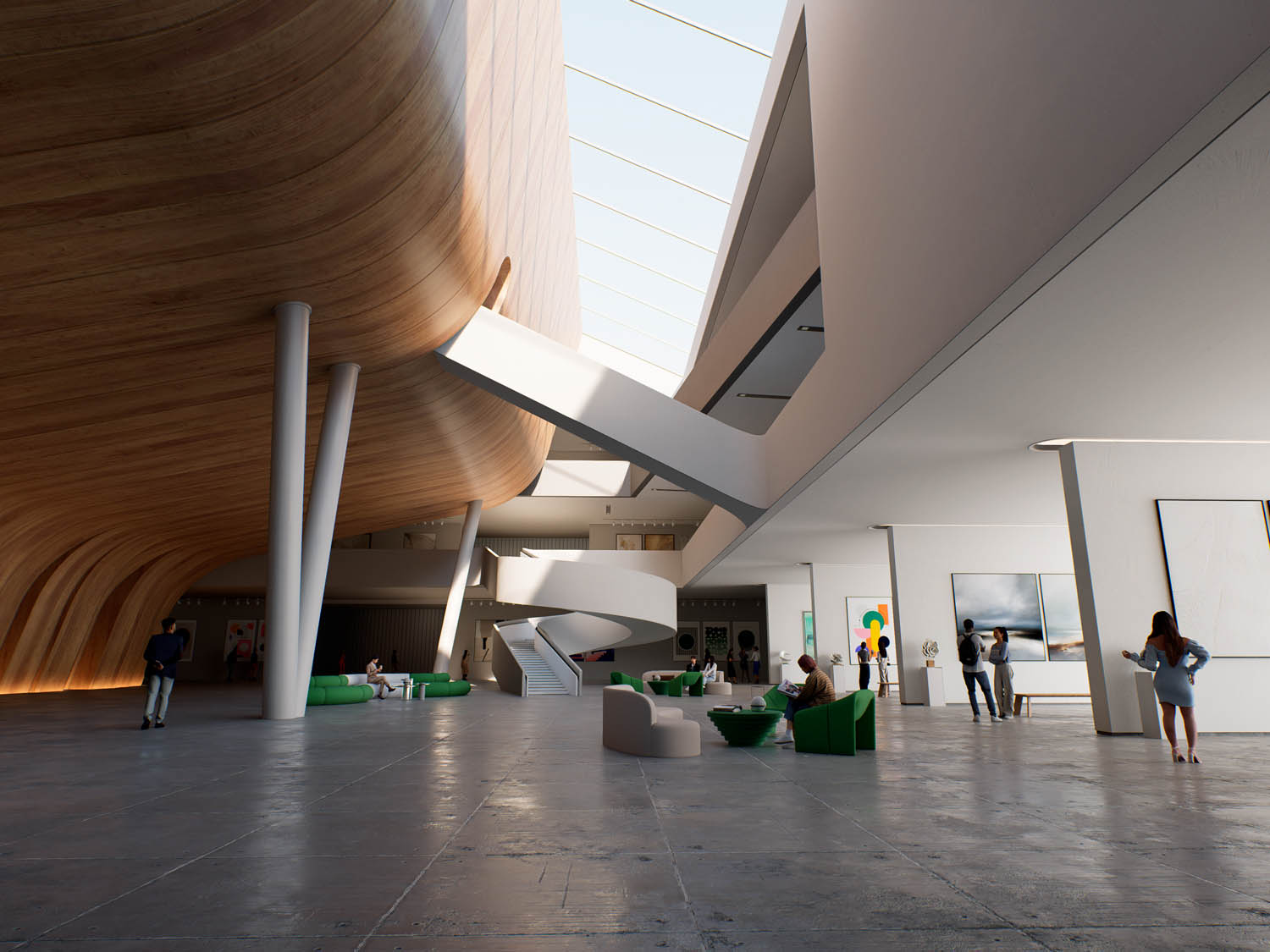
However, user experience was less convincing than the raw numbers suggest. Multi-frame generation does not appear to reduce latency, as we noticed a similar delay between moving the mouse and the model responding on screen — just like you would expect with a model rendering at 11 FPS. Visual artifacts were also evident: for example, a church steeple in the scene visibly wobbled amid the surrounding vegetation. An interior scene (see figure 3) fared better visually, but latency remained an issue.
Overall, Frame Generation shows promise, but we’re not convinced of its real-world benefits. When models are large and frame rates are low, don’t expect it to transform a stuttering viewport into one that’s silky smooth.

Conclusion
The RTX Pro Blackwell generation represents a major leap forward for workstation GPUs. Across the board, the new cards deliver substantial gains in ray tracing, AI, and general compute performance, backed by much faster GDDR7 memory and — at the top end — truly vast VRAM capacities.
For demanding professional workflows — from visualisation and simulation to reality modelling and AI — the improvements over the Ada generation are both measurable and meaningful.
The standout is undoubtedly the RTX Pro 6000 Blackwell Workstation Edition. With 96 GB of memory and unprecedented bandwidth, it enables workloads that simply weren’t practical before, while delivering exceptional performance in rendering and AI tasks. It is, however, a specialist tool: its 600W power draw and unconventional (for workstations) cooling design mean careful consideration is required around chassis, thermals, and multi-GPU configurations. For many organisations, the more efficient Max-Q variant is likely to be the more practical option – and if Nvidia’s figures are anything to go by it’s probably not that much slower.
Further down the range, the RTX Pro 4000 Blackwell and RTX Pro 2000 Blackwell offer compelling upgrades for mainstream users, bringing tangible performance benefits at more manageable power levels. Meanwhile, new software features such as DLSS 4.0 hint at how AI will increasingly shape real-time workflows — though the jury’s still out.
Ultimately, Blackwell reinforces the reality that modern GPUs are no longer mere graphics accelerators. They are high-performance compute engines capable of driving everything from photorealistic rendering to advanced AI pipelines — and, crucially, handling multiple demanding workloads simultaneously. The multitasking potential for the 96 GB RTX Pro 6000 Blackwell is simply breathtaking. It’s hard to imagine a CPU coping with the same combination of tasks without careful manual intervention, such as pinning processes to specific cores or managing priorities. But Nvidia’s monster GPU just takes everything in its stride.
This article is part of DEVELOP3D’s 2026 Workstation Special report
Features
- The rise of the 1:1 remote workstation
- Memory – shortages and rising prices: how to navigate the current crisis
- Computle: rethinking remote workstations
- Lenovo Access: simplifying remote workstations
- Creative ITC – a hybrid future
- How does your workstation setup compare? Results from our 2025 survey
- Best enterprise-class workstation laptops 2026
- Can a small workstation really handle big BIM, CAD and viz?
- Why GPU memory matters for CAD, viz and AI
Reviews
- HP Z2 Mini G1a workstation
- Lenovo ThinkStation P3 Ultra SFF Gen 2 workstation
- CyberPowerPC Intel Core U7WS Workstation
- AMD Ryzen Threadripper 9000 Series processors
- Scan 3XS GWP-B1-TR192 workstation
- Nvidia RTX Pro Blackwell Series GPUs
- Intel Arc Pro B50 GPU