

Lenovo’s compact workstation blends desktop performance with datacentre flexibility, delivering a great all rounder for mainstream CAD and visualisation workflows, writes Greg Corke
The Lenovo ThinkStation P3 Ultra SFF Gen 2 occupies an increasingly important space in Lenovo’s workstation lineup. Sitting between the diminutive P3 Tiny micro workstation and the full-size P3 Tower, this Small Form Factor machine delivers serious professional performance in a chassis compact enough for the desk, yet flexible enough for the datacentre.
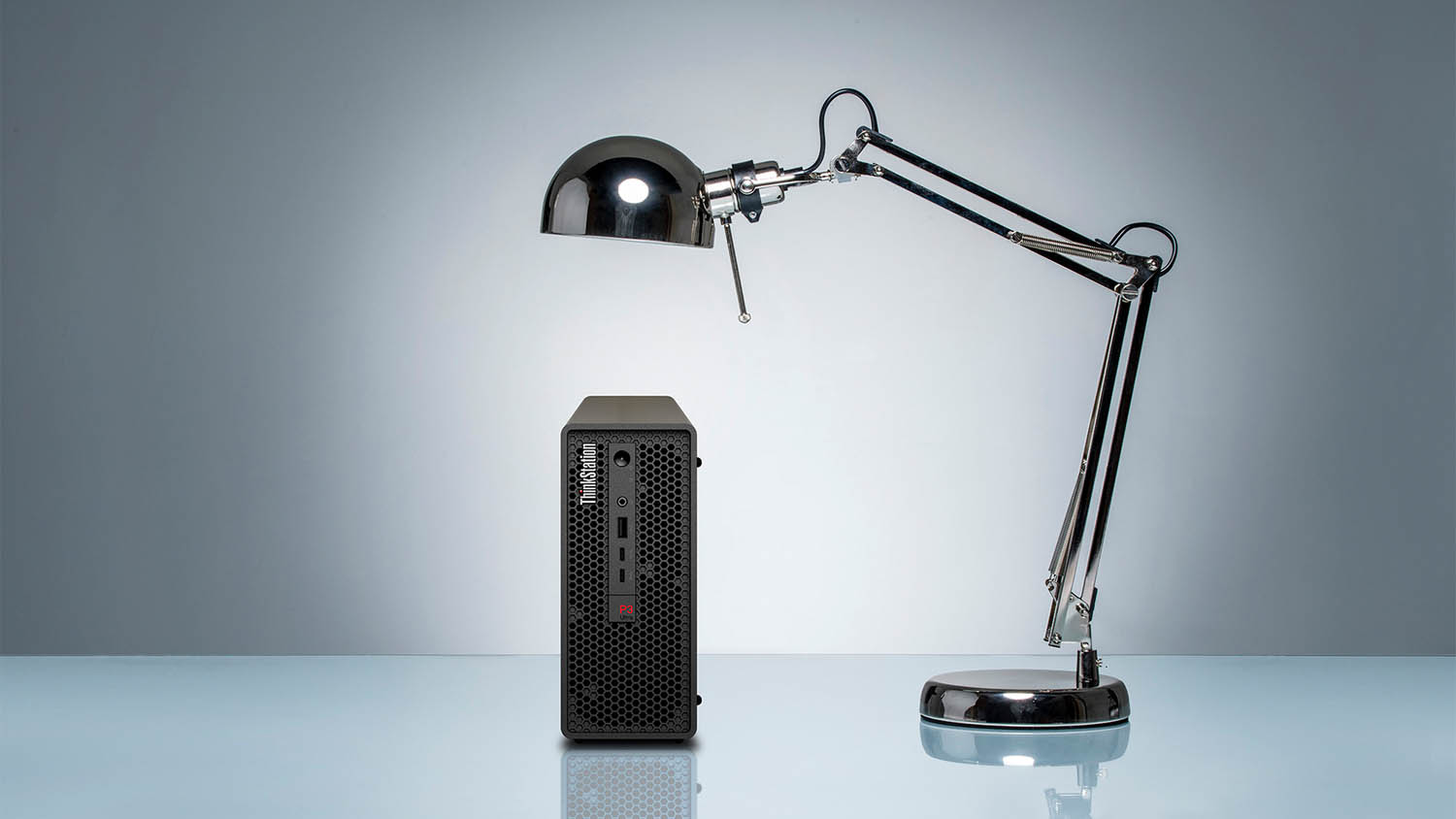
On the surface, it resembles a compact desktop workstation, with a 3.9 litre chassis measuring 87 × 223 × 202 mm. However, as we explore in our Lenovo Access feature, the P3 Ultra can also be deployed at scale in a dedicated 5U rack enclosure that holds up to seven units. For design and engineering firms looking to centralise compute resources, this versatility is a big plus. This is not just a small workstation – it’s a building block for high-density remote workstation environments.
This article is part of DEVELOP3D’s 2026 Workstation Special report
A familiar, well-engineered chassis
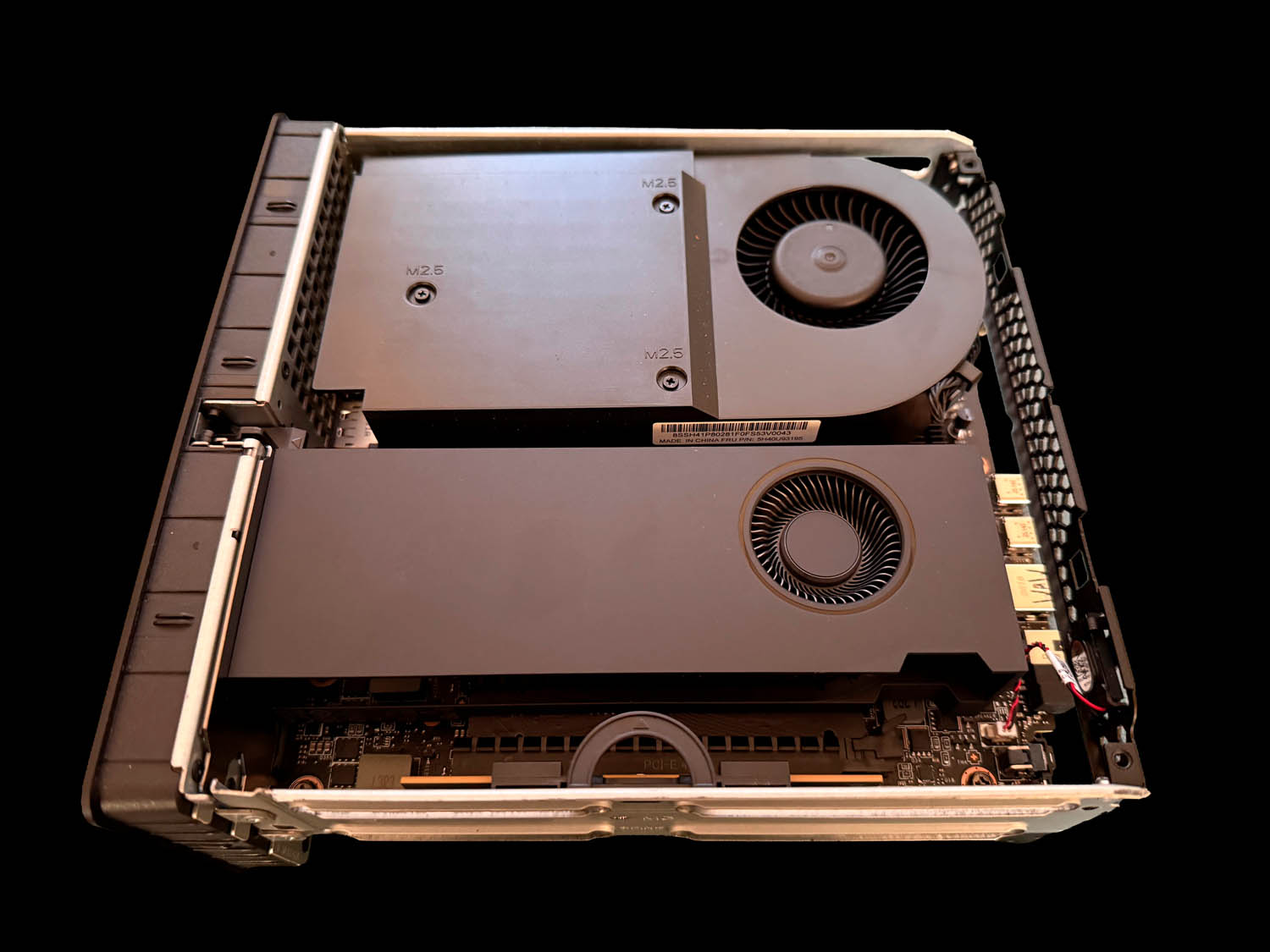
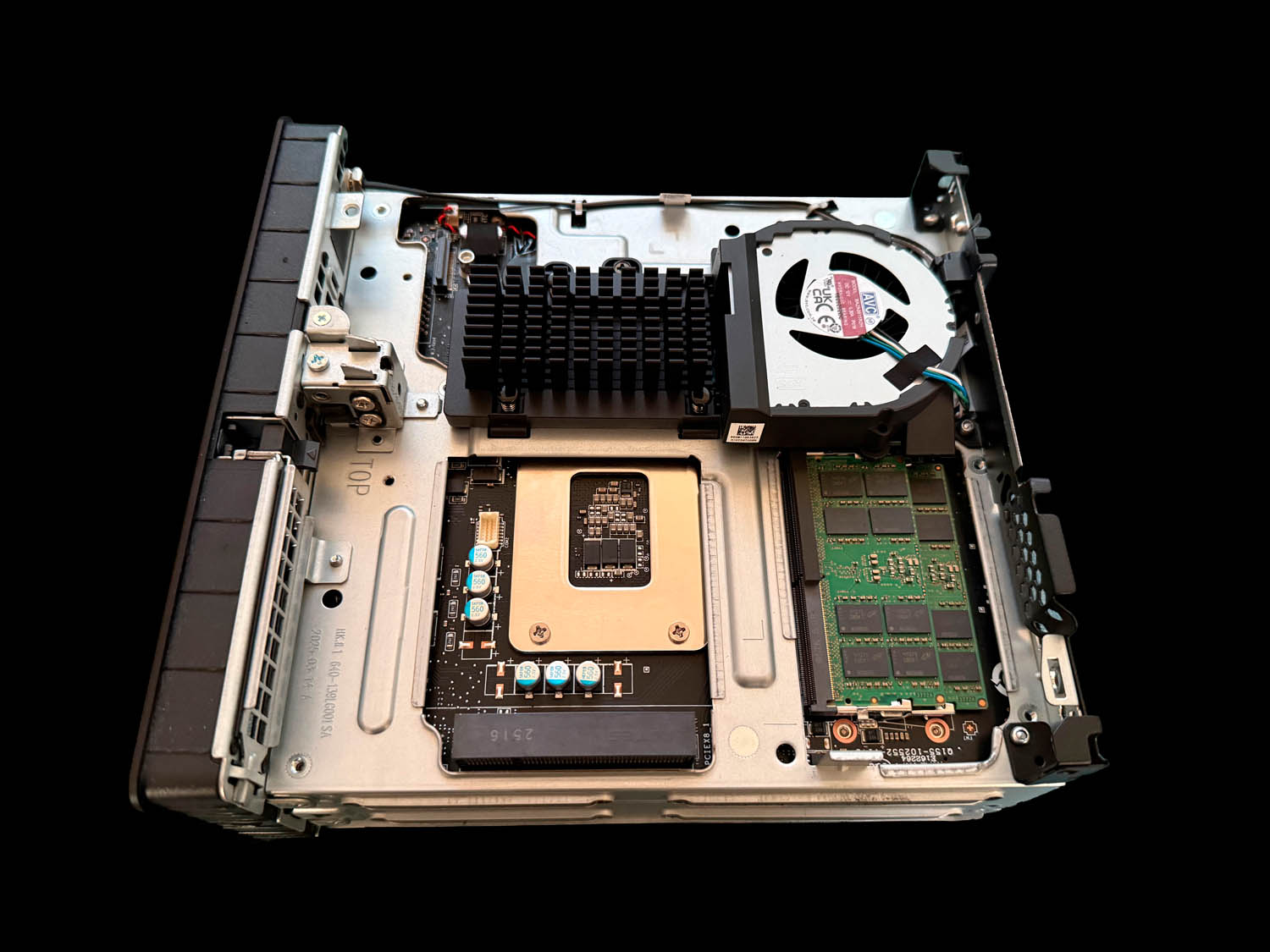
The ThinkStation P3 Ultra SFF Gen 2 is effectively the third generation of a chassis first introduced in 2022 under the ThinkStation P360 Ultra brand. Its standout feature is the well-thought-out dual-chamber layout. Unlike most desktop workstations, where components are clustered on one side, the P3 Ultra divides the interior into two zones by positioning the motherboard slightly off-centre.
On one side sit the CPU, GPU, and secondary storage; on the other, the primary SSD, system memory, and one additional PCIe card. This separation improves thermals and simplifies servicing. The CPU is cooled by a dedicated shroud and fan that exhausts directly out the rear, keeping it thermally isolated from the GPU – a smart approach in such a confined space.
Core configuration
At its heart, the P3 Ultra SFF Gen 2 is built around an Intel Core Ultra (Series 2) processor, paired with a low-profile Nvidia RTX Ada Generation GPU and up to 128 GB of DDR5 memory. Our review machine featured the Intel Core Ultra 9 285, Nvidia RTX 4000 SFF Ada (20 GB), and 64 GB (2 × 32 GB) of DDR5-6400 RAM, and is priced at £2,980.

Lenovo offers a wide choice of CPUs, with ten different models spanning 35 W, 65 W, and 125 W variants. Our review system hit the sweet spot with the 65 W Intel Core Ultra 9 285, featuring 8 Performance Cores and 16 Efficient Cores.
For just £17 more, the 125 W Core Ultra 9 285K retains the same core count but offers slightly higher turbo frequencies. In theory, this chip could deliver a tiny boost in single threaded CAD applications and additional headroom for multi-threaded workloads, though its performance will still be constrained by the chassis’ power and thermal limits.
Real-world performance
In practice, the test system delivered excellent performance in typical 3D CAD / BIM tools, including Solidworks and Revit, which rely heavily on single-threaded performance. In these applications, the P3 Ultra SFF was only marginally slower than a fully fledged liquid-cooled tower workstation running the flagship Core Ultra 9 285K – an impressive result for such a compact machine, although not unexpected.
However, physics inevitably catches up when workloads scale across many cores. In our V-Ray CPU rendering test, the limitations of the small chassis became more apparent. Under sustained load, the liquid-cooled 285K tower was up to 45% faster – hardly surprising given it has the thermal headroom to draw the full 250W and maintain all-core frequencies around 4.86 GHz.
By comparison, the P3 Ultra initially ran at 125W and 3.8 GHz, but after around five minutes of rendering settled at approximately 80W and 3.35 GHz. Temperatures dropped from an initial peak of 97°C to a comfortable 78°C. This conservative tuning makes sense for acoustics and longevity, but it does mean you can’t extract the full potential of Intel’s top-end CPUs in this chassis.
Testing the 125 W Ultra 9 285K in this platform could reveal some additional headroom, though it would never approach its theoretical 250 W turbo power – especially given the system’s 330 W PSU. Some extra performance might be possible if Lenovo allowed higher sustained power limits. However, in saying that, even the 65W Core Ultra 9 285 doesn’t get close to its theoretical max of 182 W.
Whisper quiet in everyday use
One area where the P3 Ultra SFF truly shines is acoustics. During single-threaded or lightly threaded CAD workflows the system was almost silent. Even when pushed hard with CPU rendering, together with GPU-intensive tasks such as AI image generation in Stable Diffusion, fan noise remained remarkably restrained. For users who value a quiet office environment, this is a major win.
Graphics options
Lenovo offers a choice of four low-profile professional GPUs: the single slot 50W Nvidia RTX A400 (4 GB) and RTX A1000 (8 GB) (read our review), and dual slot 70W RTX 2000 Ada Generation (16 GB) (read our review) and RTX 4000 SFF Ada Generation (20 GB) (read our review).
Our review machine featured the top end RTX 4000 SFF Ada – an excellent choice for mainstream visualisation. It delivered strong results in Twinmotion, V-Ray, D5 Render, Stable Diffusion and other GPU tests, making it a great all-rounder for architects and designers.
However, there are significant savings to be had. Dropping down to the RTX A1000 saves around £1,075, bringing the system cost under £2,000, and is perfectly adequate for most CAD workflows. The RTX 2000 Ada provides a capable entry point for visualisation at a £758 reduction.
Two points are worth noting. First, these are Ada Generation GPUs, not the very latest Blackwell models reviewed here. We expect Lenovo will introduce Blackwell GPUs later this year in any future P3 Ultra SFF revision.
Second, GPU choice has been dramatically streamlined. The Gen 1 model offered up to ten options, including several high-power laptop GPUs such as the 125 W Nvidia RTX A5500 (16 GB). This reduction is likely due to a combination of cost (developing custom laptop GPU boards), customer demand, and thermal realities.

Changes from Gen 1
Not all updates are forward steps. The most significant regression is maximum memory capacity: the Gen 2 model has just two DIMM slots, limiting maximum RAM to 128 GB, compared with 192 GB (via four SODIMMs) in the previous generation. For most users, this will be sufficient, but those working with extremely large datasets may feel constrained.
Networking has also been trimmed back: standard Ethernet drops from 2.5 GbE to 1 GbE. On the flip side, there’s now an optional 25 GbE upgrade – a big leap from the previous 10 GbE maximum upgrade. This could be particularly relevant to centralised deployments, as could support for an optional Baseboard Management Controller (BMC) PCIe card, which further underlines Lenovo’s datacentre ambitions for this machine.
Storage also gets a welcome boost. The system now supports up to three on-board M.2 SSDs, including one PCIe Gen 5. Curiously, Lenovo also offers an option for a 3.5-inch HDD, which sacrifices an M.2 slot. In an era when most workstations are moving entirely to solid-state storage, or at the very least 2.5-inch HDDs, this seems somewhat unusual, likely catering to a niche workflow or specific customer request.
Conclusion
The Lenovo ThinkStation P3 Ultra SFF Gen 2 is an impressive piece of engineering, packing strong professional performance into a remarkably small footprint while offering excellent acoustics, smart internal design, and genuine versatility.
For mainstream CAD and visualisation workflows, it hits a near-perfect balance. However, the compact chassis inevitably imposes limits in sustained multi-threaded CPU workloads, where larger tower workstations retain the advantage.
Compared to the Gen 1 model, there are a few regressions – fewer GPU options, reduced maximum memory, and slower standard networking – but these are likely to affect only a small subset of users.
Most importantly, the P3 Ultra should not be viewed purely as a desktop machine. Its ability to be deployed densely in racks and used as a 1:1 remote workstation makes it a compelling option for modern, flexible IT infrastructures.
If you need serious workstation performance without the bulk – whether on the desk or in the datacentre – the Lenovo ThinkStation P3 Ultra SFF Gen 2 deserves to be high on your shortlist.
Specifications
- Intel Core Ultra 9 285 processor (2.5 GHz, 5.6 GHz Turbo) (8 P-cores, 16 E-Cores)
- Nvidia RTX 4000 SFF Ada (20 GB) GPU
- 64 GB (2 × 32 GB) DDR5-6400 memory
- 1 TB SSD M.2 2280 PCIe Gen5 TLC Opal SSD
- External 330 W 90% efficiency PSU
- Size (W x D x H) 87 × 223 × 202 mm
- Weight 3.6 kg
- Microsoft Windows 11 Pro 64-bit
- 3 year Premier Support Warranty
- £2,980 (Ex VAT)
- lenovo.com
Remote control
Deploying the ThinkStation P3 Ultra SFF in the datacentre
IMSCAD is a leading specialist in remote workstation solutions and a pioneer in the use of cloud and Virtual Desktop Infrastructure (VDI) for CAD and 3D applications. In recent years, however, the company has increasingly focused on solutions built around compact desktop workstations in the datacentre.
CEO Adam Jull believes this oneto-one approach — particularly using systems such as the Lenovo ThinkStation P3 Ultra SFF — is set to “kill” the heavy mobile workstation for many firms. F
or Jull, the core value proposition is simple: put small physical desktop workstations in the datacentre, configure them with high frequency processors and dedicated GPUs to deliver top-end performance, remove the complexities and cost of virtualisation, and access them remotely using mature remoting technologies like Mechdyne TGX or Citrix. That way, users can swap heavy, GPU class laptops for lightweight devices, while improving connectivity to cloud services such as Autodesk Construction Cloud.
IMSCAD’s approach is deliberately flexible. Some firms run the P3 Ultras in their own datacentres, others host everything with IMSCAD in facilities around the world, for a true Workstationas-a-Service (WaaS) solution.
IMSCAD is currently working on deployments with two very different types of design firms — one large US engineering firm and one small London architectural practice.

The US firm has roughly 1,000 employees with around 600 BIM users, which have historically used powerful mobile workstations. IMSCAD is now working on a proof of concept (POC) based around 49 Lenovo ThinkStation P3 Ultras, hosted as a private cloud in the firm’s own datacentre.
The P3 Ultras are dedicated mainly to Revit and AutoCAD workflows. Each system uses an Nvidia RTX A1000 (8GB) GPU, providing solid 3D performance in a compact, rackable chassis. Following the POC the firm plans to introduce more P3 Ultras with heavier duty GPUs, such as the RTX 2000 Series, to lift certain users up to more demanding visualisation workflows.
The second deployment is a small London-based architectural practice with around 30 users that need powerful workstations. Here, IMSCAD has implemented a hybrid solution comprising VDI and one-to-one Lenovo P3 Ultra workstations .
“They’ve got 20 Revit users and eight visualisation guys that use Enscape and various other tools,” says Jull. The Revit users are served through VDI using a 4GB vGPU profile, while the viz users are relying on P3 Ultras equipped with 16 GB RTX 2000 class GPUs to give them the performance they need for real time visualisation. “You can’t do that [give users 16 GB of graphics memory] very economically in VDI,” he notes.
All of these systems – VDI and P3 Ultras – are hosted in an Equinix data centre in Wembley, with IMSCAD managing the whole environment, from GPUs and hypervisors through to remoting protocols (Leostream, Mechdyne TGX) and user access.
On pricing, Jull positions hosted P3 Ultras as comparable to VDI at the low end, and cheaper than VDI for higher end GPU needs. “It’s about £150 to £200 a month, depending on the spec,” he says, including hosting and software stack. Contracts can be weekly, monthly or multi year.
Resilience can be built in with spare P3 Ultras following an n+1 model: buy one extra unit for every small pool, or a handful of spares for larger estates. This, combined with Lenovo Premier support, helps ensure rapid recovery if a node fails, says Jull.
Importantly, many customers now buy the workstations themselves, while IMSCAD provides the service layer – hosting, configuration, monitoring and support. “You can buy them yourself and own them, and we’ll host them for you, with prices starting from as little as £50 per month,” Jull explains. This reassures firms they’re not overpaying for hardware, while still gaining the operational and mobility advantages of a professionally managed, remote P3 Ultra environment. “We even allow customers to ship us their own existing on-premise workstations and servers too,” he adds.
This article is part of DEVELOP3D’s 2026 Workstation Special report
Features
- The rise of the 1:1 remote workstation
- Memory – shortages and rising prices: how to navigate the current crisis
- Computle: rethinking remote workstations
- Lenovo Access: simplifying remote workstations
- Creative ITC – a hybrid future
- How does your workstation setup compare? Results from our 2025 survey
- Best enterprise-class workstation laptops 2026
- Can a small workstation really handle big BIM, CAD and viz?
- Why GPU memory matters for CAD, viz and AI
Reviews
- HP Z2 Mini G1a workstation
- Lenovo ThinkStation P3 Ultra SFF Gen 2 workstation
- CyberPowerPC Intel Core U7WS Workstation
- AMD Ryzen Threadripper 9000 Series processors
- Scan 3XS GWP-B1-TR192 workstation
- Nvidia RTX Pro Blackwell Series GPUs
- Intel Arc Pro B50 GPU