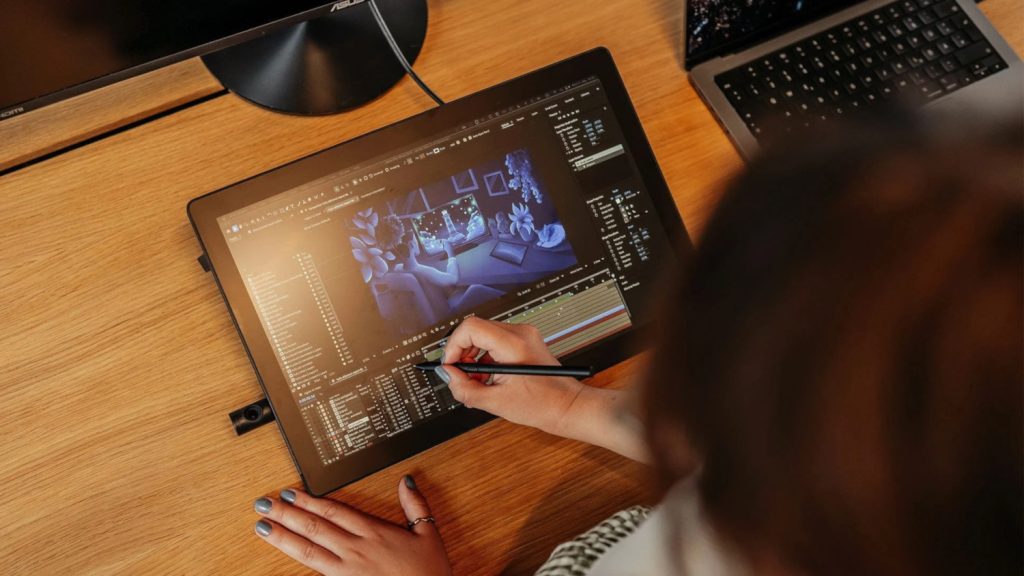

Welcome to DEVELOP3D’s round-up of graphics and display tablets, compiled to help you navigate a crowded market that offers new levels of technological sophistication at many different price points
With so many graphics and display tablets on the market, how can you know which one’s right for you? Are you looking for a device that provides on-the-go creativity and fits neatly in your back pocket? Or do you need a permanent desk fixture that integrates seamlessly with your current set-up?
Whatever your requirements, you’ll quickly find that noticeable parallax and pens with batteries that don’t last a full working day are problems largely consigned to the past. What customers now get are paper-like drawing experiences, customisable keys, photorealistic colours and battery-free, interchangeable pens.
A word of warning, however: Watch out for hidden costs! The cost of add-on accessories can quickly mount up, making budget-friendly options rather more expensive than they first appear.
Regardless of budget or requirements, DEVELOP3D has compiled this list to help readers navigate the many options available and identify the tablet that best suits their individual needs.
Wacom Cintiq Pro 27 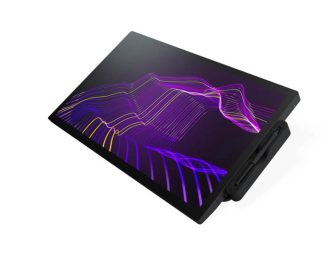
£3,249 | www.wacom.com
A long-time industry standard, the Wacom Cintiq Pro 27 is a high-end graphic display with a high-end price tag to match. The smooth 27-inch LCD 4k display offers 120 HZ refresh rate and 10 ms response time for near zero latency.
Users get 99% Adobe RGB and 98% DCI-P3 and HDR support out of the box. The display is equipped with HLG (hybrid log-gamma), which allows it to render images that appear truer to human eye perception than the standard dynamic range.
A new driver interface provides new ways to speed up and simplify workflows, including customisable pen gestures and on-screen pen and touch controls.
The Wacom Pro Pen 3 included, offering 8,192 levels of pressure sensitivity and three side switches. Despite the price, no stand is included in the purchase – a requirement for use if you don’t already have an existing VESA 100 mount.
» 24-inch 4K (3,840 x 2,160 resolution) OLED display
» 1.07 billion colours (99% REC 709, 99% sRGB, 99% Adobe RGB, 93% DCI-P3)
» 618.50 x 388.00 x 34.70mm / 6.9 kg
» 3 Button Pen + Eraser v2 and Thin Pen + Eraser v2 (both pressure-sensitive, cordless and battery-free)
» 8,192 levels of pen pressure (finely tuned pressure curve)
» Windows 7 or later, Mac OS X 10.13 or later, Linux
Xencelabs Pen Display 24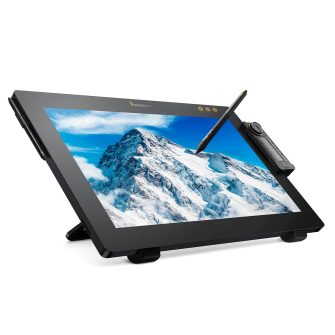
£1,850 | www.xencelabs.com
Designed for studio creatives, the Pen Display 24+ is Xencelabs’ updated interactive display.
The stylus-controlled panel comes at the lowest price point in the ‘Pro’ category, but offers many of the same features as close competitors, including Super AG Etching screen, 44 customisable quick keys and a 4K Ultra HD display. Calman Ready capabilities are built in for reliable colour accuracy. All accessories needed are included, including two customisable pens. The device supports HP Anyware and Parsec, enabling seamless remote access to your workstation.
The included Quick Keys remote features an OLED display and physical dial with four modes for improved efficiency, including a Virtual tablet mode that allows multiple monitors to be controlled as one seamless canvas.
» 24-inch 4K (3,840 x 2,160 resolution) OLED display
» 1.07 billion colours (99% REC 709, 99% sRGB, 99% Adobe RGB, 93% DCI-P3)
» 618.50 x 388.00 x 34.70mm / 6.9 kg
» 3 Button Pen + Eraser v2 and Thin Pen + Eraser v2 (both pressure-sensitive, cordless and battery-free)
» 8,192 levels of pen pressure (finely tuned pressure curve)
» Windows 7 or later, Mac OS X 10.13 or later, Linux

Huion Kamvas Pro 27
£1,999 | www.huion.com
The Huion Kamvas Pro 27 is a studio-class 27-inch 4K UHD resolution display tablet offering a crystal-clear workspace factory with colours calibrated and certified.
Huion’s Canvas Glass uses nano etching (similar to that offered by Xencelabs) to give its surface anti-glare properties and a paperlike feel. The PenTech 4.0 has a 2g initial activation with a thinner nib (0.35mm) than previous models and tilt auto-alignment that tracks the mouse better and reduces parallax.
Although not included, adding the Huion Keydial Mini gives users 18 keys and a dial controller that can be custom-configured.
» 27-inch 4K (3840 x 2160 (16:9) UHD display
» 1.07 billion colours (99% sRGB / 98% Adobe RGB / 97% DCI P3)
» 656.1 x 405 x 22.7mm / 8 kg
» Pen tech 4.0 3 button standard grip pen + Eraser & Pen tech 4.0 3 button slim form pen + eraser (pressure sensitive, cordless, battery free)
» 16,384 levels of pen pressure
» USB-C HDMI display port, dual USB-A ports and headphone jack
» Huion Keydial Mini can be added for £59
» Windows 10 or later, macOS 10.12 or later, Android 6.0 or later, Linux
Wacom Cintiq 16 (2025)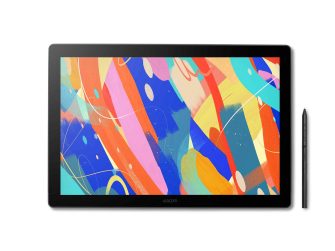
£650 | www.wacom.com
New for 2025 is an updated Wacom Cintiq 16, which is great for students, as well as for pros on a budget, and offers some of the industry-leading technology for which Wacom is highly regarded.
The Wacom Cintiq 16 offers a full 2.5k resolution display, complete with antiglare coating for vibrant colours. It doubles as a second monitor as well as a tablet, hence the need to be connected to a computer. The device also comes with Wacom’s latest pen technology included, in the form of the Wacom Pro Pen 3. Cordless and battery-free, this pen charges using EMR (electro-magnetic resonance) tech, drawing power from the tablet itself, so it never needs recharging.
Weighing just 2kg, the Cintiq 16 is light enough to hold on your lap for more comfortable sketching sessions. However, it also features integrated foldable legs for users engaged in more desk-orientated work.
» 16-inch (2560 x1600 resolution) display
» 16.7 million colours (DCI-P3 99%, sRGB 100%)
» 259 x 384 x 15mm / 2kg
» Wacom Pro Pen 3, battery-free with two programmable side buttons
» 8192 levels of pen pressure
» USB-C port with DisplayPort Alt Mode, or HDMI port and USB port, internet access to download driver
» Windows 10 or later, Mac OS X 10.13 or later, Android 8.0 or later
Xencelabs Pen Display 16 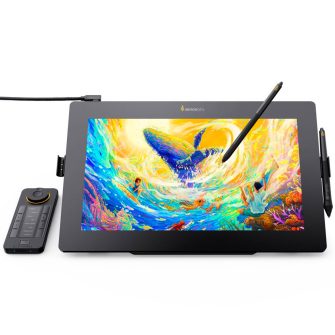
£969 | www.xencelabs.com
Designed for creative professionals on the go, the Xencelabs Pen Display 16 offers many of the same capabilities as the company’s Pen Display 24+ but at a lower price point. It has a 16-inch 4K OLED screen which delivers 1.07 billion colours. The Super-AG etched and optically bonded screen reduces glare and offers bright, clear images.
The inclusion of five factory-calibrated, pre-loaded, industry-standard colour spaces means that no colour calibration is required. In Virtual tablet mode, it can be used to select and control objects on another display and thus integrates well with existing workflows.
The Pen Display 16 comes with two differently sized stylus pens, both with built-in ‘erasers’ that can be customised using the Xencelabs driver app. A single USB-C cable design offers simplicity, by both sending the signal and powering the device. A souped-up ‘Bundle’ option also gives purchasers an adaptor hub, travel easel and Quick Keys device for £1,079.
» 16-inch 4K (3,840 x 2,160 OLED display
» 1.07 billion colours (98% Adobe RGB; 98% P3-D65)
» 410 x 259.4 x 12mm / 1.21 kg
» 3 Button Pen + Eraser v2 and Thin Pen + Eraser v2 (both pressure-sensitive, cordless and battery-free)
» 8,192 levels of pen pressure (with fi nely tuned pressure curve)
» USB-C port with DisplayPort Alternate Mode (UHD), or D
Apple iPad Pro 11-inch 
£999 | www.apple.com
If you’re looking for a display tablet that can do a bit of everything, then the Apple iPad Pro may be a good option for you. The Ultra Retinal XDR display with tandem OLED technology offers great brightness and contrast and you can use Reference Mode for colouraccurate workflows.
Apple’s new-for-2025 M5 chip off ers improved performance and efficiency. The 10-core GPU with powerful new Neural Accelerators speeds up AI tasks, from large language model (LLM) token generation to generative imagery. The multi-threaded CPU and faster memory deliver high speed workflows.
There is also the added benefit of owning a tablet that can be used for more than graphics. With the iOS 26 update, the iPad more closely resembles a laptop than ever before. Compatibility with other Apple products is a draw here; if you’re already using a Mac, an iPad will seamlessly integrate with your workflow.
As with many Apple products, there are additional costs. The Apple Pencil Pro is not included with the tablet, and will set you back an additional £129. A larger display (13-inch) ups the price to £1,299.
» 11-inch ultra retina XDR with tandem OLED display
» 249.7 x 177.5 x 5.3mm / 444g
» Pen not included
» Thunderbolt/USB 4 port
» iPadOS 17 or later
Gaomon M10K Pro Pen Tablet 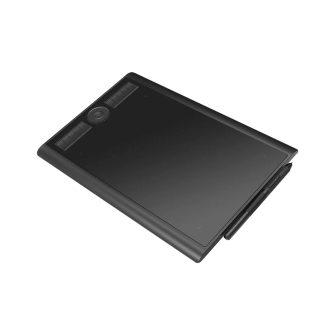
£71 | www.goamon.net
The Gaomon M10K is a lightweight, budget graphics tablet designed to boost mobile creativity. It offers something that other tablets on this list don’t: it can be linked with Android smartphones as well as computers. And when you can connect directly to your phone, many users fi nd they no longer need to carry around a laptop.
The AP32 pressure-sensitive pen with two customisable buttons is included along with 10 Hot Keys and a Dial Controller for quick selections. You can programme the dial and keys based on your preferences, making tweaks to page scrolling, colour picking and brush adjusting options.
Although very much at the lower end of the price scale, this tablet does offer some great features and the flexibility of connecting to a smartphone means this would be a good device to throw in a bag when you’re travelling light.
» Working Area in PC Mode 255.06 x 159.84mm
» Working Area in Phone Mode 159.84 x 89.9mm
» 360 x 240 x 10.5mm / 780g
» AP32 Pen (pressure sensitive, cordless, battery-free)
» 8192 levels of pen pressure
» Micro USB port
»Windows 7 or later, macOS 10.12 or later, Android 6.0 or later
Remarkable Paper Pro Move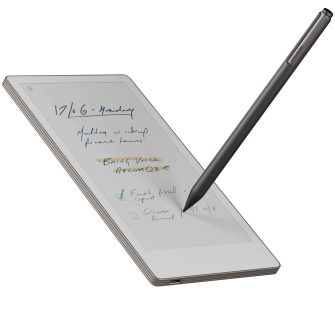
£399 | www.remarkable.com
The Remarkable Paper Pro Move packs the same punch as the Remarkable Paper Pro, but fits in your back pocket (literally). With no apps and notifications, this is a distraction-free, on-the-go tablet that is perfect for quick notes and sketching.
It offers features such as handwriting-to-text conversion, cloud storage to access notes from anywhere, and integration with other tools such as Google Drive, Microsoft OneDrive and Dropbox. It is made from 50% recycled materials and designed for easy repair. While not affecting day-to-day use, this will give the eco-conscious customer peace of mind.
If you’re looking to ditch the burden of carrying around a paper notebook for all those quick notes and sketches, then the Remarkable Paper Pro Move gives you the simplicity of pen and paper with cloud storage.
» 7.7-inch canvas colour display with palm rejection and adjustable reading light
» 195.6 x 107.8 x 6.5mm / 230g
» Choose between the Marker (wireless charging) or the Marker Plus (wireless charging and built-in eraser)
» USB-C port
» Remarkable OS (a custom, Linux-based operating system for digital paper displays)
Wacom Movinkpad 11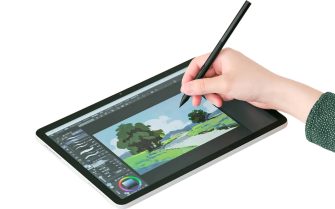
£390 | www.wacom.com
Perfect for beginners, students and creative hobbyists, the Wacom Movinkpad 11 offers a flexible and mobile drawing solution. With no PC or other device required, this graphics tablet is powered by a fully independent Android operating system.
Preloaded with Wacom Canvas and a 2-year Clip Studio Paint debut licence, this tablet is ready to go straight out the box. You also get cloud-free auto-saving via Wacom Shelf, so none of your hard work gets lost.
The Wacom Pro pen 3 is included, just as it is with Wacom’s top range tablets, but this tablet is also compatible with other drawing pens, including models from LAMY, Staedtler, Kaweco and Samsung. Beyond drawing, the Movinkpad also functions as an Android tablet.
» 11.45-inch display
» 266 x 182 x 7mm / 590g
» Wacom Pro Pen 3
» 8,192 levels of pen pressure
» USB-C port
» Android 14
This article first appeared in DEVELOP3D Magazine
DEVELOP3D is a publication dedicated to product design + development, from concept to manufacture and the technologies behind it all.
To receive the physical publication or digital issue free, as well as exclusive news and offers, subscribe to DEVELOP3D Magazine here