
DriveWorks 23 has launched, adding a raft of user enhancements and productivity upgrades to help automate and streamline the design, sales and manufacturing processes.
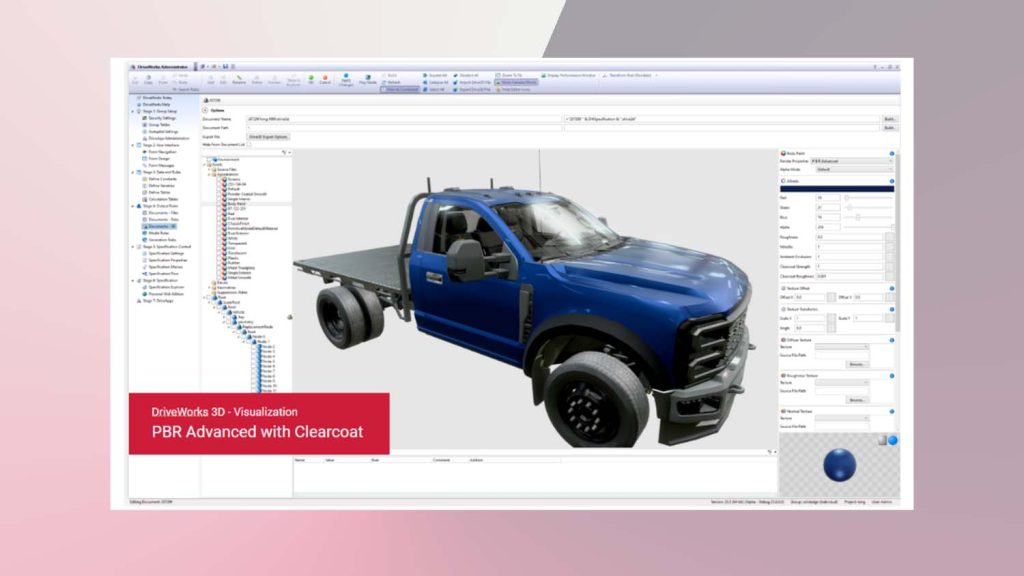
3D appearance enhancements are the most visual of all DriveWorks 23 updates, with additions such as PBR Advanced Clearcoat to replicate coatings such as varnish or water on materials where light is reflected before being transmitted to the base layer.
Optionally, users can apply advanced refraction properties to control how much light is refracted and how the refraction effect splits the red, green and blue light.
A new modelling primitive has been added in Ruby, which can quickly and easily add geometry with irregular surfaces to test textures, lighting and animations. It can also act as a reference model to add a sense of scale to a DriveWorks 3D scene.
Design automation is improved with file search functionality upgrades, while Solidworks PDM Pro has updates for Specification Macro Tasks and 11 new Generation Tasks.
Updates to DriveWorks Pro Server configurator tool splits out DriveWorks Pro Server Management Console and DriveWorks Pro Server Dashboard, providing enhanced connectivity for all users.
The DriveWorks Pro Server has been redesigned as a browser based utility, maintaining all existing functionality but with the additional benefits, including the ability to use the latest future proof technology, enhanced security measures, access to the Pro Server Web Application Dashboard remotely, as well as adding a streamlined modern UI.
Key to DriveWorks is its ability to quickly manage calculations, and DriveWorks 23 sees updates to its Higher Order Functions abilities with data now able to be transformed by a DWLambda. TableMap applies a Lambda Function across a provided table or array to transform the data into a new array.
For DriveWorks’ CPQ and Dashboard Drive apps, there is enhanced out-of-the-box functionality and faster implementation time. Other elements like ‘breadcrumbs’ displayed in the header bar are now interactive and allow users to quickly navigate to any previous page from any sub-menu. Other UI tweaks include further user customisation of tiles and appearance settings.
“To deliver effective technology solutions, we research and actively listen to the DriveWorks community of users, including customers, resellers, and authorized partners, continually gathering feedback from enhancement requests and other community forums,” said a DriveWorks spokesperson. “Continually developing our technology drives us forward and ensures we deliver solutions for current and future engineering and manufacturing challenges.”