Welcome to The D3D 30, our round-up of 30 new technologies from around the world that we firmly believe could give your product development work a major boost
The D3D 30 is our annual round-up of 30 new technologies that we believe have an important role to play in the product development processes of our readers.
Chosen from companies around the world, our hope is that you find something here for your own personal toolbox, to make you more productive in 2025.
Some of these technologies are from start-ups that we’re excited to see take their first steps out of stealth mode. Others come from established companies that continue to develop new capabilities within existing systems or launch brand-new tools to take customers in new and thrilling directions.
We’re delighted to showcase this illustrious group, selected entirely on merit. Our listing includes new takes on modelling, innovative ways to tackle big data challenges, fresh approaches to 3D printing and more – all with the aim of helping our readers design and build the products and systems of the future.
Our previous lists in 2020, 2021, 2022, 2023 and 2024 have highlighted new technologies that we’ve watched grow in terms of capability and adoption. Speaking with readers, we know that many of them have since been adopted in businesses around the globe and become vital to your workflows.
We have faith that the Class of 2025 will offer you many more such candidates – and hopefully, you’ll have the chance to get hands-on with many of these in the months to come, including at our free, single-day conference and exhibition, DEVELOP3D LIVE, which returns to the UK on 25 March 2026.
| 3D SYSTEMS FIGURE 4 135 |
ALLOY ENTERPRISES COPPER STACK FORGING |
AMD RYZEN AI MAX PRO |
| AUTODESK NEURAL CAD |
BACKFLIP AI SCAN-TO-CAD |
BAMBU LAB H2D PRO |
| CADENCE MILLENNIUM PLATFORM |
CAMPFIRE XR DESIGN REVIEW |
COLAB AUTO REVIEW |
| DASSAULT SYSTÈMES CATIA STELLAR RENDER ENGINE |
DASSAULT SYSTEMES SOLIDWORKS AURA |
DEPIX.AI IMAGELAB |
| DRAFTER INC DRAFTER SOLIDWORKS INTEGRATION |
DYNDRITE LBPF PRO |
FIGUREMENT FIGUREMENT |
| FINAL AIM FINAL DESIGN |
HP ZBOOK ULTRA G1A |
HYPERSKETCH HYPERSKETCH FOR IPAD |
| KEYSHOT KEYSHOT STUDIO AI |
LENOVO LENOVO ACCESS |
MATOHA INSTRUMENTATION LTD. PLASTELL |
| MEDIAMAN JESTER3D |
NEXCAD.AI AI CHECKER |
NTOP MATERIALISE MAGICS 2025 INTEGRATION |
| PNY RTX PRO 2000 BLACKWELL |
PTC CREO COMPOSITES DESIGN |
PTC ONSHAPE MODEL-BASED DEFINITION |
| SIEMENS SIMCENTER TESTLAB |
TOOLKIT3D DESIGN APPS |
TOOLPATH AUTODESK FUSION INTEGRATION |
3D SYSTEMS
FIGURE 4 135
Automation Ready
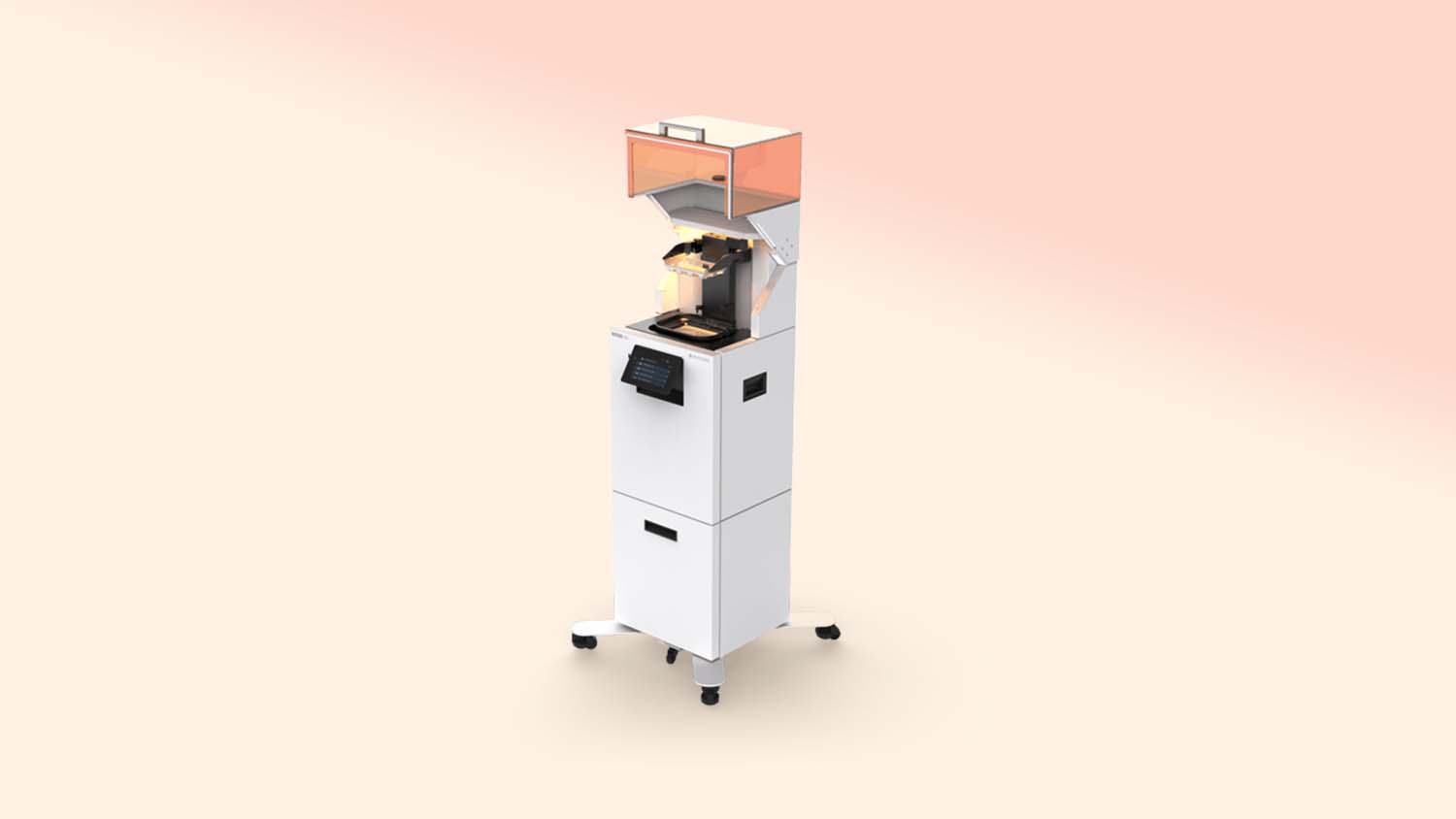
The 3D Systems Figure 4 has proven a workhorse 3D printer since its standalone version launched in 2018. Its latest incarnation, the 135, builds on the platform’s broad materials catalogue and high-definition output with out-of-box accuracy and repeatability.
Designed for high mix, low volume manufacturing, replacing or supplementing injection moulding, when combined with a material like 3D systems’ flame-retardant Tough 75C FR Black, it means that for parts like electrical connectors, the step-up from a prototype to production is only a click away. Prepared for automation, the 135 has the power to evolve as your demands grow.

ALLOY ENTERPRISES
COPPER STACK FORGING
Cooler Runnings
Serving as an alternative to 3D printing metal, Alloy Enterprises Stack Forging process allows for a single-piece construction that eliminates leak points common in traditional liquid cooling systems.
Its build volume of 300 x 250 x 200mm can now create copper parts in addition to its existing aluminium, making it even more potent for its target market of liquid cooling for data centre hardware.
Compared to traditional cooling methods, Alloy’s topology optimised designs can use targeted liquid cooling where heat loads are highest, while a massive reduction in pressure required means smaller pumps and bigger energy savings.
AMD
RYZEN AI MAX PRO
Max Headroom
The AMD Ryzen AI Max Pro processor is redefining what compact workstations can do – both laptops and desktops. With up to 16 high-performance CPU cores and a remarkably powerful integrated GPU, it delivers serious performance in a small, energy-efficient package.
Its memory architecture is where it really shines. The integrated GPU can access up to 96 GB of system memory, handling large datasets smoothly — no VRAM bottlenecks or out-of-memory crashes, like you can get with some discrete GPUs.
That makes it ideal for memory-intensive AI and viz workflows, especially with recent added support for tools like KeyShot and (later this year) V-Ray.
Overall, the Ryzen AI Max Pro sets a new benchmark for compact workstations. Right now, you can find it powering the HP ZBook Ultra G1a laptop and HP Z2 Mini G1a desktop.
AUTODESK
NEURAL CAD
AI Beginnings
Autodesk says that its 3D generative AI foundation model, Neural CAD, is set to reimagine geometry creation in Fusion – potentially automating up to 90% of routine tasks in the CAD software.
It’s early days yet, but initial demonstrations have shown promise – adding a handle to a power drill, simply by selecting the connecting geometry on an existing CAD model and sketching a rough form, with the AI generating a detailed 3D handle that is aligned correctly and follows the existing design intent.
Neural CAD models are trained on professional design data, letting it reason at both a detailed geometry level and at a systems and industrial process level. Autodesk has grand plans for it.
 BACKFLIP AI
SCAN-TO-CAD
Scanning Made Good
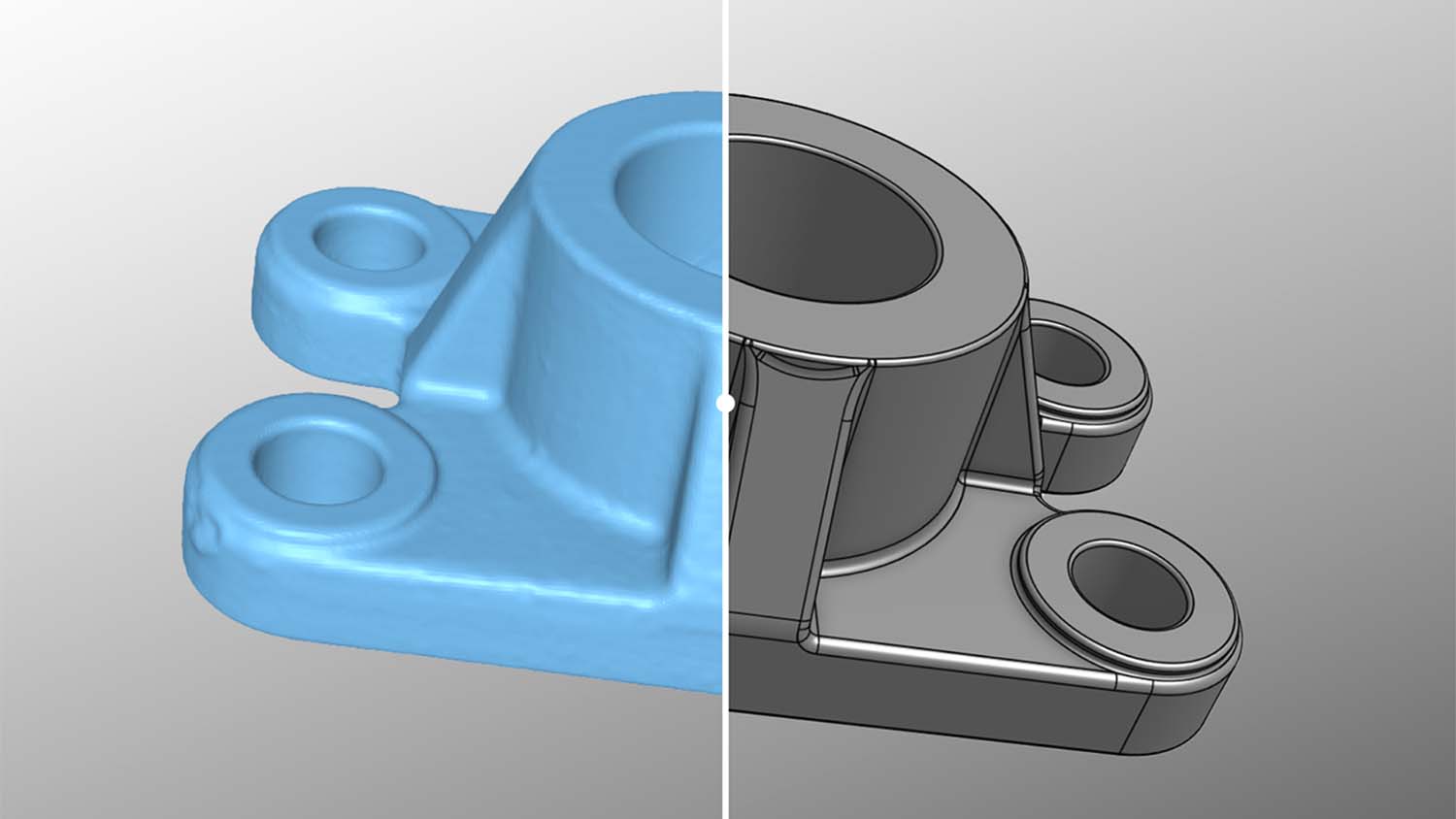
Backflip’s AI model is capable of transforming 3D scan data into parametric CAD in a matter of seconds – with plug-ins for Solidworks, Onshape and a standalone web app.
Automatically converting surface data into clean geometries designed for existing 3D CAD is a huge timesaving and doing it with intelligence is key – a factor strengthened by the Backflip team’s background in manufacturing.
Backflip’s plug-ins show each step of the process used to build a part’s geometry and generates a native feature history that users can modify, letting you fine tune the generated 3D model in the CAD environment you’re most used to.
BAMBU LAB
H2D PRO
The Desktop Darling
The H2D Pro has firmly established Bambu Lab in the professional space, having spent the past few years delighting makers and YouTubers with its low-cost 3D printers.
This enterprise-focussed desktop 3D printer has been equipped for professionals. Its dual tungsten carbide extruders can reach 350 °C and a 120 °C build plate mean it can handle tougher carbon-filled materials. Yet it’s the speed and accuracy of the 3D printer that are its main strengths – its output is genuinely impressive for such a rapid machine.
Available through local resellers, technical support is now an option, but with a fully loaded version costing just over £3,000 it’s a low-risk option to add more in-house production.
CADENCE
MILLENNIUM PLATFORM
Simulation on Steroids
Picking up from the CFD-focussed Millennium M1, the M2000 supercomputer has been built in partnership with Nvidia to tackle broader AI-accelerated, multiphysics simulations for engineering applications.
To call it a luxury would be an understatement, but this turnkey combination of powerful hardware (Nvidia HGX B200 systems, RTX PRO 6000 Blackwell GPUs and CUDA-X libraries and solver software) and Cadence’s simulation software promises deeper insights from AI to tackle the most complex multi-physics simulations.
Available for use either as a cloud-based service or as an on-premises supercomputer, it’s a blazing hot option for speed and scale where needed.
CAMPFIRE
XR DESIGN REVIEW
Immersive Insights
Campfire’s spatial collaboration platform XR Design Review offers broad hardware support for headsets, iPads and more, allowing anyone – from the boardroom to the factory floor – to join a design review.
Capable of displaying interactive 3D scenes, users can examine, pull apart and edit designs, and draw measurement lines on their designs and on real-life elements around them for quick measuring.
It’s a smooth and slick visual experience that’s quick to start and allows you to see the others in the ‘room’, making this tool click and bringing reviews to life wherever you are.
COLAB
AUTO REVIEW
An Extra Eye
According to CoLab, designers are spending nearly a quarter of their time on administrative tasks. Its AI-powered Auto Review has been designed to help users shed those repetitive design checks to get teams back designing.
Able to adhere to common standards and practices, as well as company-specific design rules, it can validate 2D and 3D models across PTC Creo, Siemens NX, Dassault Systèmes Solidworks and Catia.
Furthermore, AutoReview can flag design features that have previously caused issues in manufacturing, failed products or led to warranty claims.
 DASSAULT SYSTÈMES CATIA
STELLAR RENDER ENGINE
Stellar Results
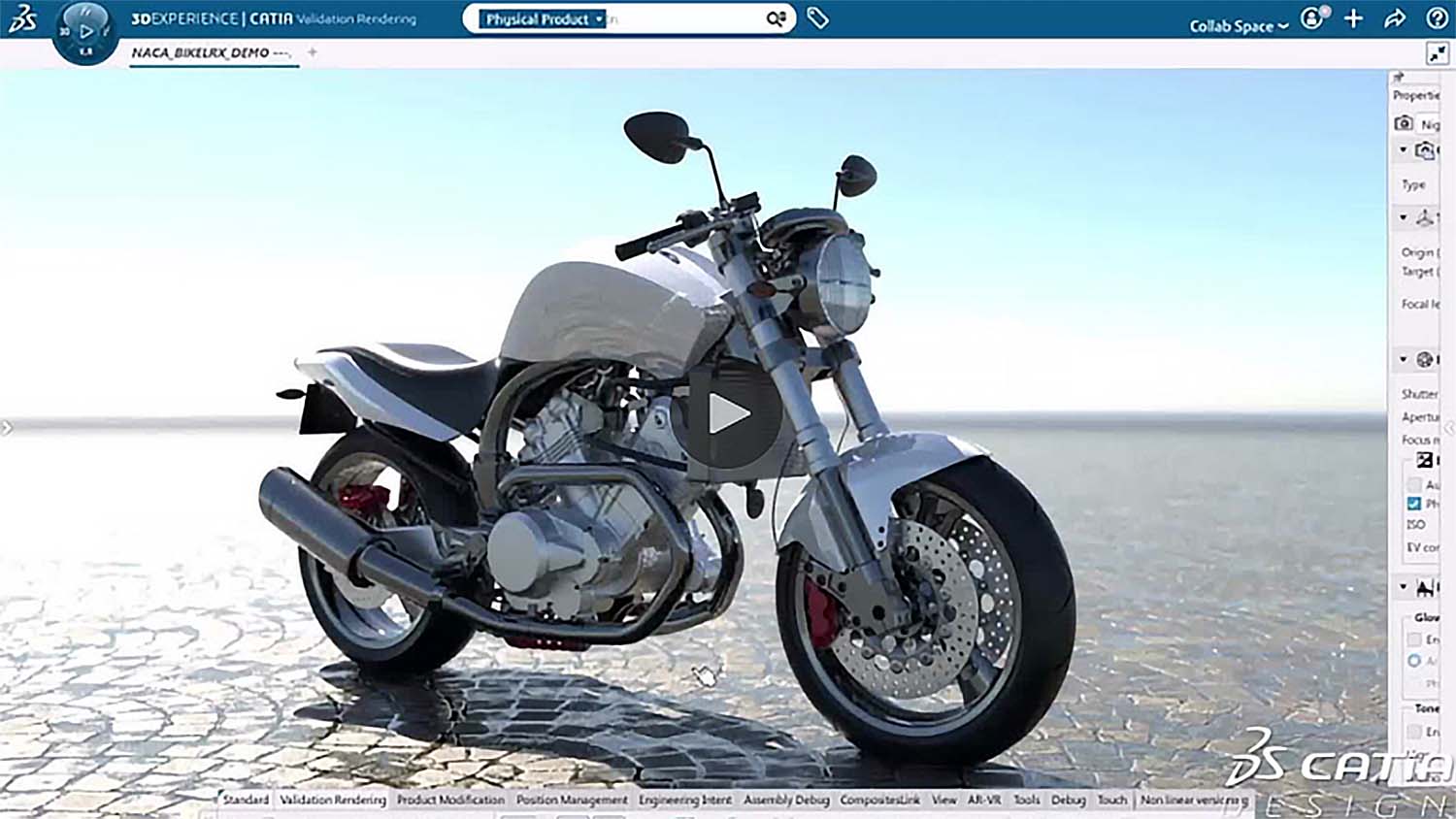
Catia’s styling and visualisation tools have had a glow-up in its 2025x release, omitting its dated renderer for the faster, sharper and more realistic Stellar Interactive Rendering Engine.
The update is ideal for appraising the aesthetics of Catia’s Class-A surfacing while keeping the workflow in the same software, so to provide a smoother workflow. Stellar Interactive Render Mode offers optimised global illumination, bridging the gap between real-time and maximum-quality rendering while laying on physical-based lighting and human perspective. Material realism is improved with iridescence and translucency options, texture tone mapping, and EXR support.
This makes it a great option for surface designers continuously checking a model’s surface appeal while needing fast feedback.
DASSAULT SYSTÈMES SOLIDWORKS
AURA
A Glowing Future
With the biggest install base of all the CAD softwares, the addition of AI to Solidworks was always going to be a litmus test, so it was shocking to see Aura announced so early.
At present Aura sits as an automate and assist tool — removing repetitive work and predicting user intent through features like Smart Mates, Fastener Recognition, Command Predictor and Generative Drawings.
Where it heads next – and when – will be the big shift, but already Solidworks has plans for Aura acting as an orchestrator, coordinating agents across design, simulation and manufacturing.
DEPIX.AI
IMAGELAB
Picture This
Depix has evolved from offering AI-generated backgrounds for renders, to now promising some of the most jaw-dropping sketch-to-photoreal visuals.
Its ImageStudio product allows the same for CAD models – simply snap a screenshot and drag and drop onto the canvas – allowing users to generate mood variants or seasonal looks in seconds. Control is added via a chocolate box of presets, giving users fast options for image and video content.
Once you’re done in the early concepting stage, ImageLab takes on another life generating brand stories and marketing content with photorealistic humans modelling, alongside or even riding in the products.
DRAFTER INC
DRAFTER SOLIDWORKS INTEGRATION
Between The Lines
Any software that alleviates the time necessary to produce 2D drawings is fine in our book. With a range of AI-enabled options now available, Drafter is one of those worthy of your attention.
Drafter’s Solidworks integration puts it at the heart of the action; the plug-in allowing users bi-directional sync between Drafter’s automated 2D drawing creation and the 3D SolidWorks model, generating an accurate standardised ASME Y14.5-2018 compliant GD&T drawing. Built on AWS GovCloud, security is tight, leaving you ready to put it to work.
 DYNDRITE
LBPF PRO
Laser Accuracy
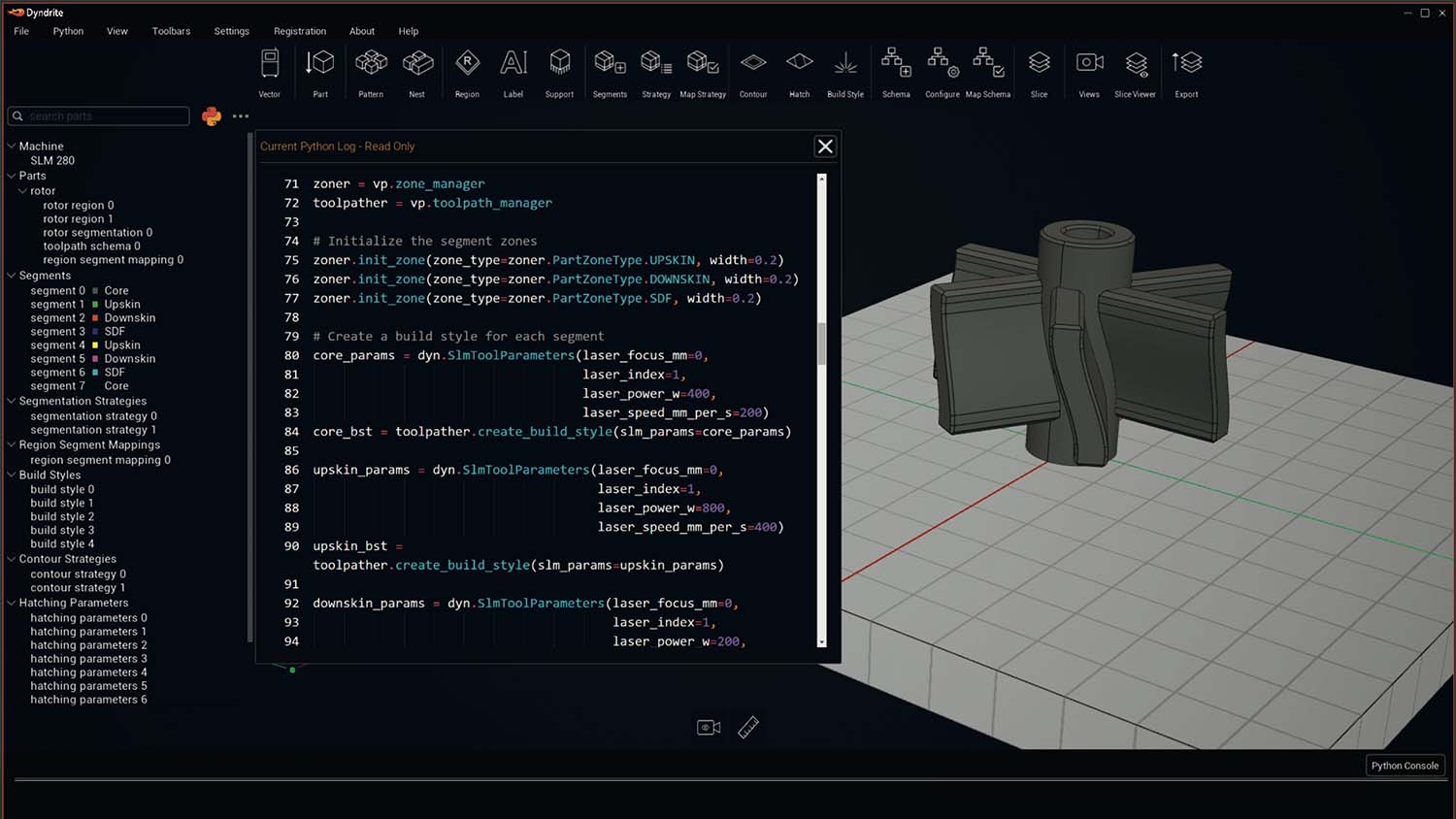
For users of Laser Powder Bed Fusion (LPBF) metal 3D printers, the level of control Dyndrite’s software can provide, along with its speed of preparing files and generating toolpaths, is eyecatching stuff.
Built on Dyndrite’s GPU-accelerated engine, it can handle huge complex geometry files and large data sets including native CAD with ease, hooking up directly to your EOS, Nikon SLM, Renishaw, Additive Industries, Aconity3D printer or Velo3D printer (with more to be added at no extra cost).
It’s smart and intuitive, and gives manufacturers precise control over every vector, parameter, and laser, while features such as the ability to add part marking and labelling at the earliest stage reduces risk of process error.
 FIGUREMENT
FIGUREMENT
CMF Cloud Collab
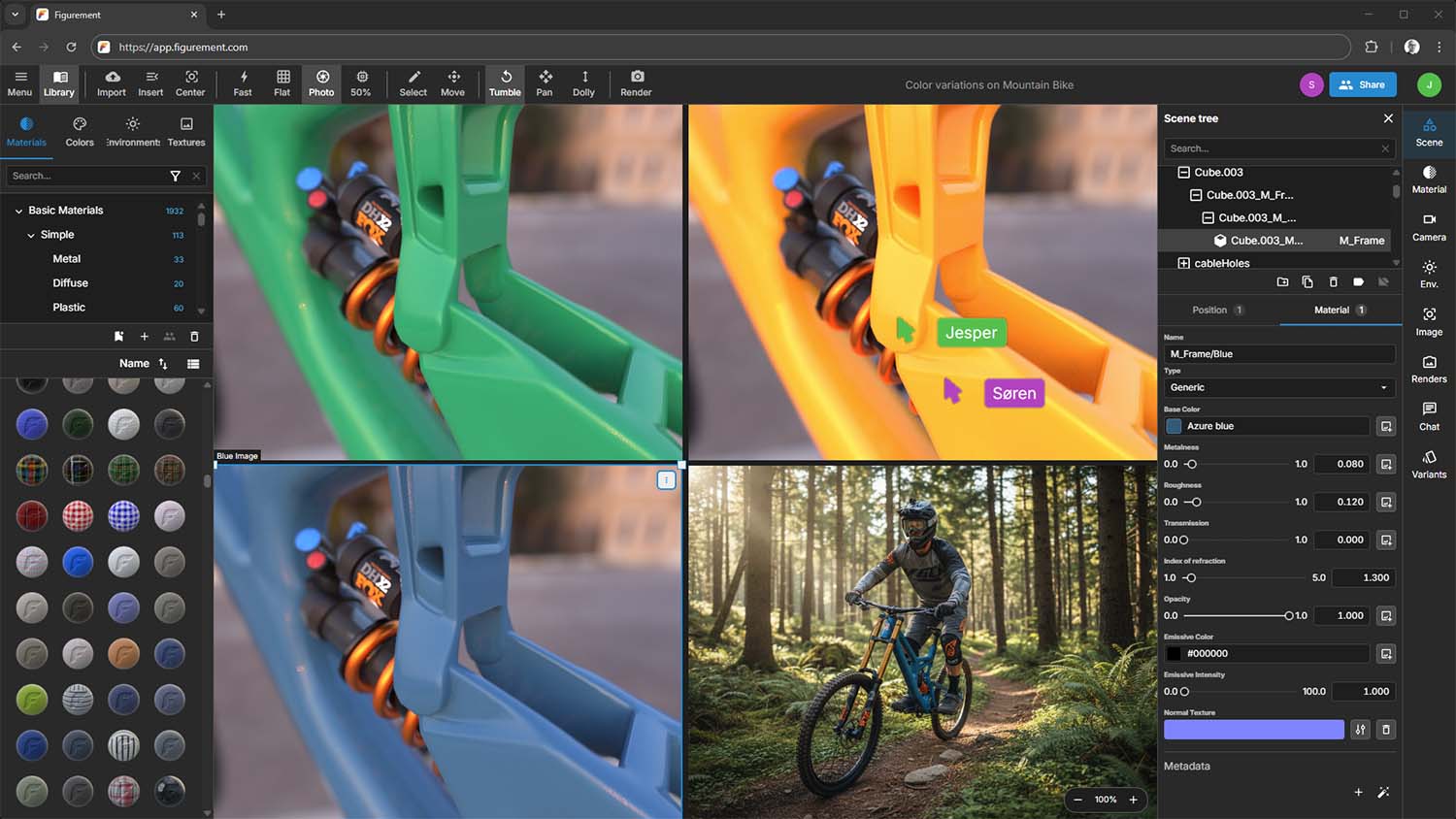
A browser-based rendering platform accessible anywhere, Figurement allows for greater project collaboration and less visualisation gatekeeping – moving beyond static handoffs into a world of real-time iteration.
The centralised cloud environment replaces local files, meaning assets and CMF libraries can be shared faster while fresh angles and changes can be viewed almost instantly.
Text prompts can then generate AI backgrounds, surroundings, or even users while still in Figurement’s UI, while users maintain control over hero model, its CMF, and scene viewing angles and composition. The quality of its results is excellent, although Figurement’s real strength lies in its accessibility.

FINAL AIM
FINAL DESIGN
On Target IP
A smart contract tool, Final Design is a tool designed to protect intellectual property and creative designs from unauthorised use or outright theft – something all designers need to consider when generative AI can produce hundreds of variations in just minutes.
AI aside, there are many more traditional issues around IP where Final Design can come to the rescue, all through a simple user experience.
Every time you upload your data to the platform, it triggers a smart contract to securely log it on the blockchain. It’s been reviewed internationally by various law firms to ensure it holds water in the worst-case scenario.
 HP
HP
ZBOOK ULTRA G1A
14-Inch Powerhouse
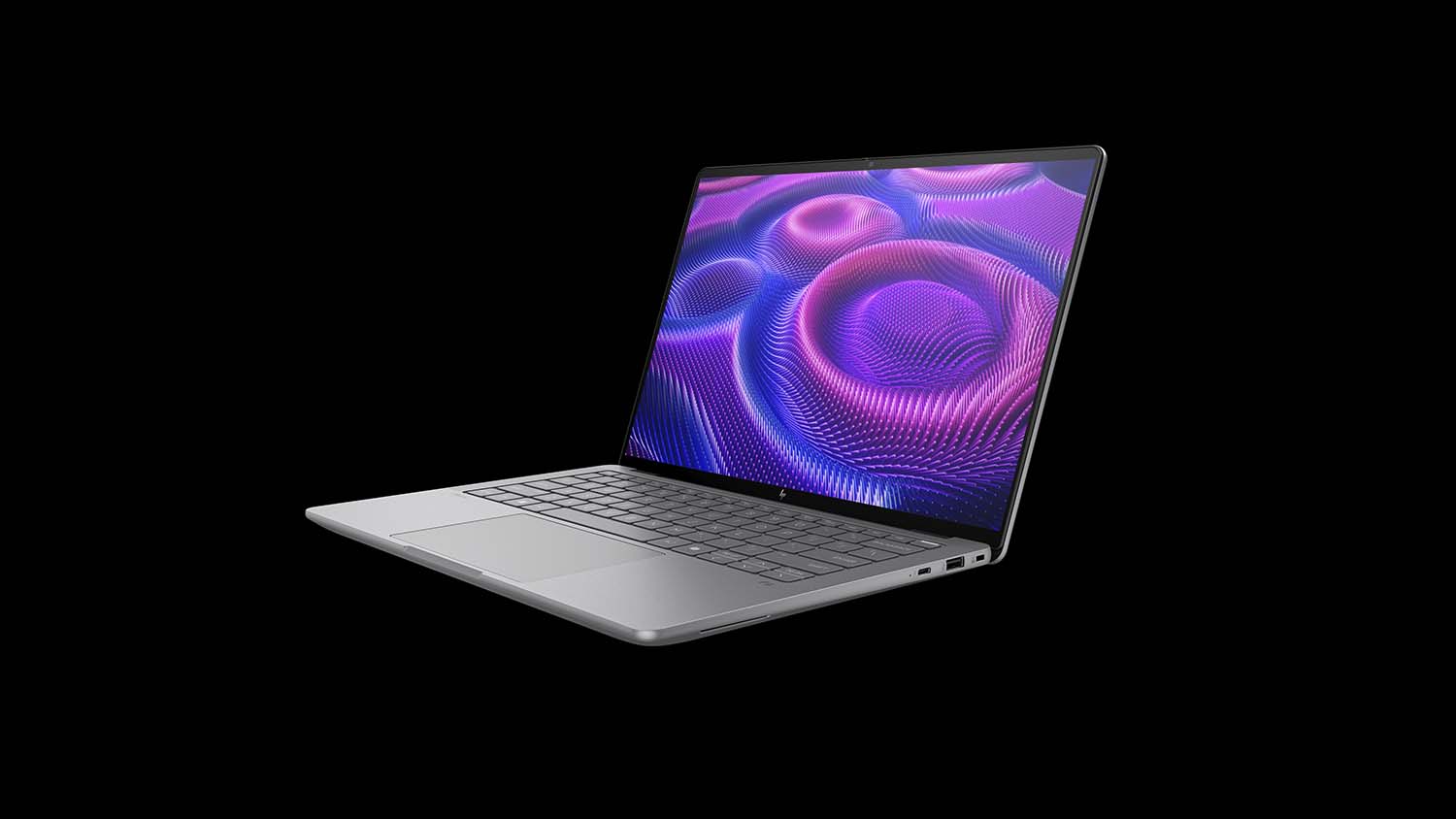
You don’t often see “14-inch” and “powerhouse” in the same sentence, but the HP ZBook Ultra G1a changes that. Powered by the AMD Ryzen AI Max Pro processor with integrated Radeon GPU, it packs the kind of punch you’d normally expect from a much larger 15- or 17-inch laptop.
For product designers, that’s a big deal — it’s the first 14-inch mobile workstation that can genuinely handle GPU-accelerated 3D visualisation workflows in tools like KeyShot, not just 2D or 3D CAD.
Despite all that power, it’s slim, light, and impressively efficient, running cool and quiet even during long CPU or GPU renders.
The HP ZBook Ultra G1a really feels like a milestone moment for 14-inch mobile workstations.
HYPERSKETCH
IPAD APP
First Impressions
In the age of AI, Hypersketch comes closest to an off-the-cuff napkin sketch.
Free to download and intuitive to use on the ubiquitous iPad, it can transform a child’s doodle into 50 product concepts in a matter of minutes. So, imagine what it can do in the hands of a professional.
A nice range of sketch and paint tools can be selected and a remarkable amount of detail and finesse can be achieved. However the point is all about lightning-fast sketch ideation anywhere, anytime, with the results becoming more fully-formed with a hit of the Brainstorm button.
KEYSHOT
KEYSHOT STUDIO AI
Triple Threat
With new generative AI rendering tools launching seemingly each week, we were eager to see how industry heavyweight Keyshot would approach the topic.
With KeyShot Studio 2025.2, the visualisation experts have debuted its first foray into artificial intelligence, and KeyShot Studio AI doesn’t disappoint, with three apps within.
While Restyle (prompt-based style direction), Imagine (unlimited fast concept generation) and Background (generates new settings and backdrops) modes all produce excellent output, it’s their ability to work locally on the user’s computer that will open it up to more projects than others, making it possible to make full use of generative AI even on confidential products.
LENOVO
LENOVO ACCESS
Remote Muscle
Lenovo Access is a new remote workstation solution that delivers full desktop power wherever you’re working. It combines high-performance workstation hardware with easy-to-deploy “Blueprints” — pre-configured reference architectures that make rollout simple for IT teams and resellers.
You get the same turbo-charged CPU and GPU performance as a dedicated workstation, but accessed remotely — with no compromise, even in demanding 3D applications.
The first Blueprint features seven rack-mounted Lenovo ThinkStation P3 Ultra SFF workstations in a 5U shelf, running Mechdyne’s TGX remote graphics protocol, with support for other protocols already in development.
Robust remote management and security tools keep everything secure and running smoothly. In short: remote workstations that don’t feel remote anymore.
MATOHA INSTRUMENTATION LTD.
PLASTELL
Poly Good Stuff
Matoha has developed a portable scanner to identify plastics, creating the perfect device for help with reverse engineering, competitor product breakdowns or even sorting through workshop waste and old 3D printed models for recycling.
With each scan taking less than a second, and no training required, the device has a simple physical interface that reads out what the material is.
Capable of recognising common plastics straight out of the box (PET, PVC, PE, PP, PS, PC, PMMA, PLA, ABS), Matoha’s team can add further specialist plastics to its repertoire upon request.
MEDIAMAN
JESTER3D
Control The Narrative
Jester3D might be part of a service offering from digital creative agency Mediaman, but its ability as a visualisation software to build and control a scene generated by AI has left us impressed.
Developed inhouse to meet the huge demand for digital marketing content from its clients, its output is perfect for internal ideation or social media campaigns. A library of high-quality 3D assets built by the Mediaman team allows the client to experiment with building scenes around products, guiding the AI by adding simple block shapes, positioning cameras, writing prompts and hitting go.
 NEXCAD.AI
AI CHECKER
Checked-Off
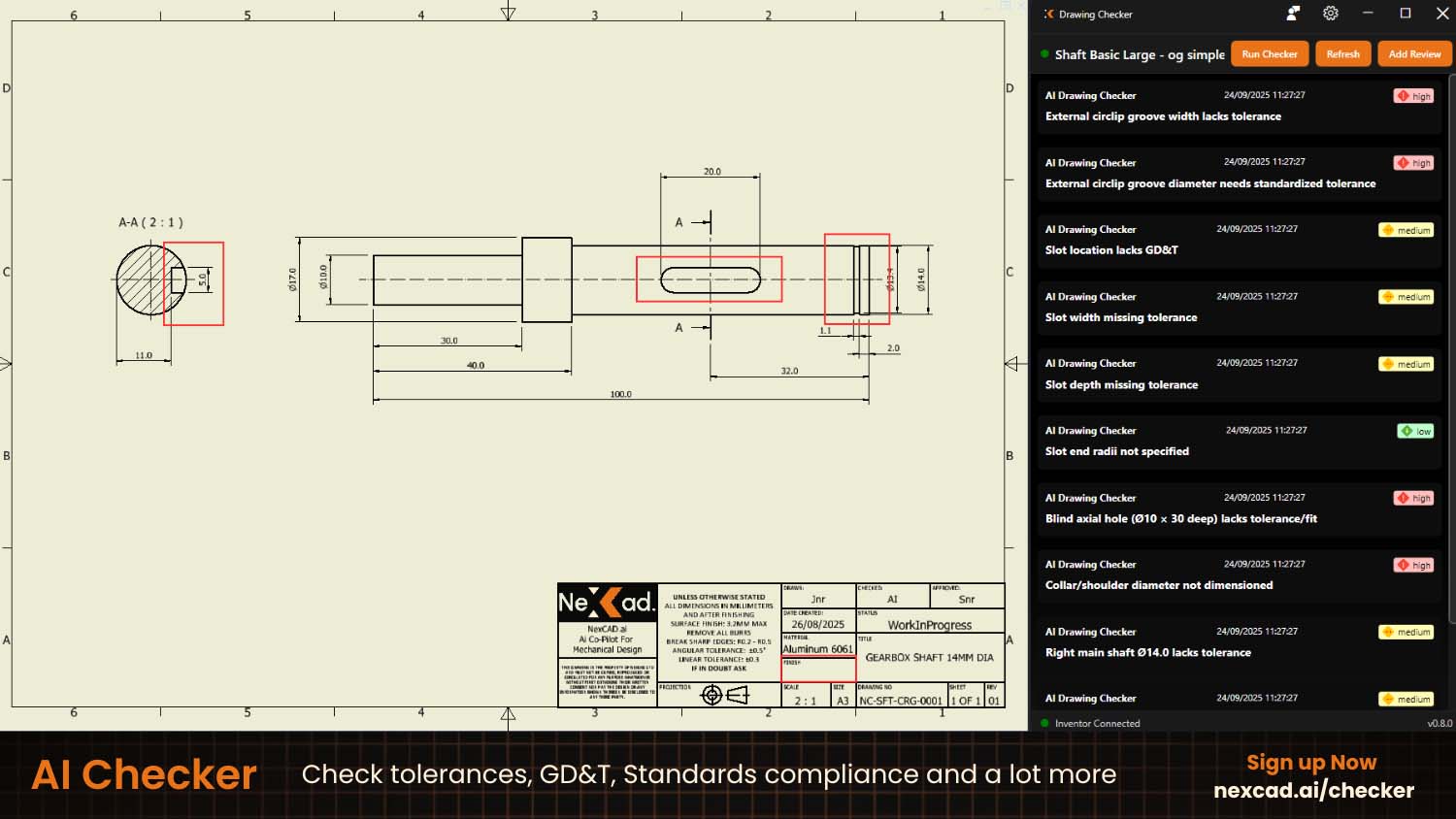
AI Checker from NexCAD offers intelligent automation for engineering drawing reviews. Initially launched for Autodesk Inventor, expect it to roll out for other CAD packages, cutting review times and highlighting costly manufacturing errors before they happen.
The platform automatically scans engineering drawings for missing dimensions, tolerance inconsistencies, and standards violations, giving engineers instant feedback.
Each review builds an internal knowledge base ensuring consistency and smarter checks, letting AI handle the repetitive tasks while designers can focus on creativity and problem-solving.

NTOP
MATERIALISE MAGICS 2025 INTEGRATION
Making Magic
Designing high complexity, computationally enhanced parts is one thing, but making them a physical reality is another, hence why nTop’s link-up with 3D Printing experts Materialise is a big step forward.
Making the most of Materialise’s next gen Build Processors for metals and polymers, it can process nTop implicit geometries without the need for mesh conversion, drastically reducing preparation time for complex parts.
Paired with Materialise’s slicing capabilities, it means the design and production of parts previously not possible due to huge data and memory requirements. Advanced functionalities such as measurements, wall thickness analysis, nesting, and STEP file export mean that it’s also applicable for CNC machining workflows too.
PNY
NVIDIA RTX PRO 2000 BLACKWELL
Small But Mighty
The Nvidia RTX Pro 2000 Blackwell GPU offers workstation performance in a compact package. Built for tiny machines like the HP Z2 Mini G1i and Lenovo ThinkStation P3 Ultra SFF, it packs a punch without hogging space — on your desk or in the datacentre. And with a full-height bracket, it can also fit standard towers.
Optimised for 3D CAD, viz, and AI workflows, Nvidia says it’s up to 1.6× faster for 3D modelling, 1.4× faster for CAD, and 1.6× faster for rendering compared to the previous Ada generation. AI tasks also see a 1.4× boost in image generation and 2.3× in text generation.
What’s more, with 20 GB of GPU memory — 25% more than before — it can load larger datasets entirely on-board, keeping demanding viz and AI workflows running fast and efficient.
PTC CREO
COMPOSITES DESIGN
Stronger Stuff
Creo 12 has delved into increasing useability across the board, but the standout progress is in composites design where PTC has gone from zero to potentially best in class in little over three releases.
The rise of composites use across multiple industries is partly the reason why PTC has so enthusiastically embraced the technology, but that’s not to say it is lacking in any of the tools needed for key industries like aerospace.
With geometric processing algorithms specific to composite parts, users can now use Creo to design parts, develop full fidelity composite layups, and transition this all the way to manufacturing.
PTC ONSHAPE
MODEL-BASED DEFINITION
Designer Details
The cloud-based model-based definition (MBD) capabilities within Onshape is yet another example of the fully cloud-based CAD package bulking up its toolset for serious designers.
The new MBD abilities allow teams to embed all common product manufacturing information directly into the 3D CAD model – including dimensions, tolerances, annotations, surface finishes, material specifications, and more – removing the chore of interpreting 2D drawings.
The move will mean users can work faster, with greater clarity and fewer errors, while being cloud-native means information can be shared using URLs that open direct in the browser, preserving model display settings, section views and annotations.
SIEMENS
SIMCENTER TESTLAB
Testing Transformed
AI-assisted workflows are promising big things in 2025, but Siemens is pushing what can be done with AI for accuracy and efficiency in analysis software like its Simcenter Testlab.
AI is credited with making the modal analysis processes in Testlab up to seven-times faster, reducing the resources and skilled manpower needed to perform accurate physical testing. Automated data capture and processing via the new analysis dashboard streamlines the testing workflow, allowing users to test faster, smarter and earlier than ever before.
Testlab works with Simcenter SCADAS hardware to acquire the data. So confident is Siemens that its own software will prove first choice for analysis, it has opened up the platform to export data in universal or third-party formats.
TOOLKIT3D
DESIGN APPS
Best Foot Forward
Footwear is one of the most exciting sectors of product design right now, and Toolkit3D’s suite of industry-focussed apps is a slick package that covers three of its core elements.
With an app for Insoles, Midsoles, and Design-to-Mold, each addresses a critical step in the footwear development process, from scan-to-print insoles to profile-driven midsoles and tooling-ready moulds.
For a simple route into custom manufacturing orthotics, or building-out consumer applications for running shoes, Design Apps allow users to turn scans and profiles into ready-to-produce designs at scale.
 TOOLPATH
AUTODESK FUSION INTEGRATION
Magical Milling
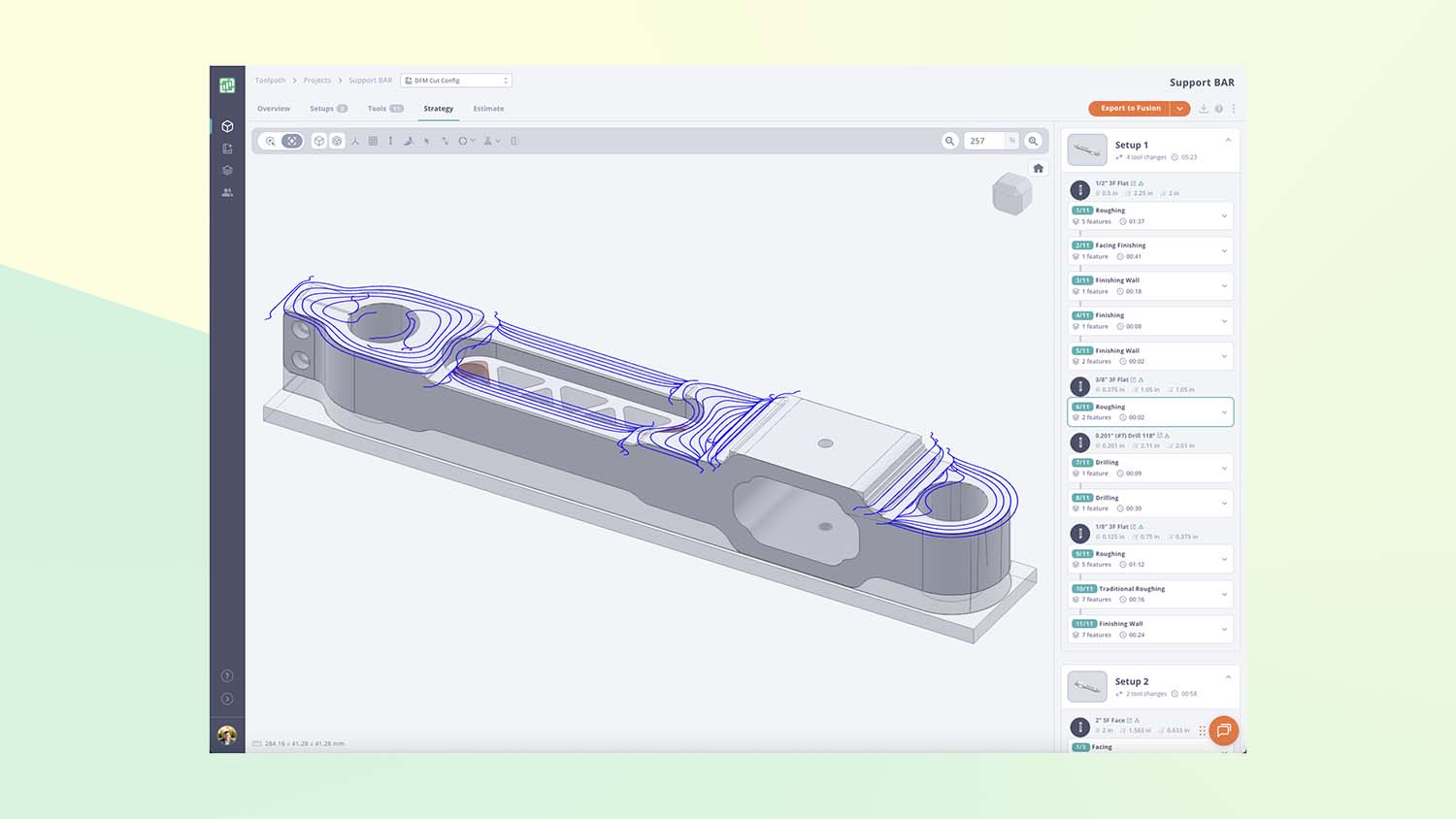
A seamless integration with Autodesk Fusion’s manufacturing workspace sees Toolpath use AI to help automate time-consuming tasks like design-for-machinability analysis, quoting and CAM programming. Run a part through Toolpath and out comes a complete machining plan complete with cost estimates, the optimal number of setups and the most efficient series of toolpath operations, all based on the tools you have at your disposal.
It’s AI-powered productivity done right, allowing businesses to free up the time and talents of machinists for the more complex, hands-on work.
It’s so good that Autodesk has become the latest to invest in the company, further guaranteeing Toolpath’s development for Fusion in the future.
DEVELOP3D is a publication dedicated to product design + development, from concept to manufacture and the technologies behind it all
To read the 2024 D3D 30 List, click here
To read the 2023 D3D 30 List, click here
To read the 2022 D3D 30 List, click here
To read the 2021 D3D 30 List, click here
To read the 2020 D3D 30 List, click here
To receive the physical publication or digital issue free, as well as exclusive news and offers, subscribe to DEVELOP3D Magazine here
For more product development technology news, reviews, features, and invitations to DEVELOP3D LIVE events, register for DEVELOP3D updates here