Articles tagged with Cocreate

Inneo Prios Foundation

Published 11 November 2009

Posted by Alan Cleveland

Article tagged with: cocreate, siemens, inneo prios foundation, inneo, microsoft sharepoint, ptc productpoint

Add comment (0 comments)

PTC Media & Analyst Event 2009

Published 08 February 2009

Posted by Greg Corke

Article tagged with: solidworks, inventor, proengineer, ptc, cocreate, arbortext, windchill

Add comment (0 comments)

Inventor Fusion goes Public

Published 04 February 2009

Posted by Al Dean

Article tagged with: autodesk, autodesk inventor, synchronous technology, inventor fusion, cocreate, direct modelling

Autodesk has officially launched Inventor Fusion (we reported on it at AU late last year). The company has finally come out from the cloud of secrecy surrounding Inventor Fusion and talked to the press/media about it openly. While there’s not been a great deal new learned in the last few days (as it’s still a while away from becoming available) it’s worth answering the major questions that cropped up. We’ve also got some better quality video showing how the system works in different use cases, so let’s mix up the two.

#1: Why?

Fusion #1: Here you’ll see how the system is configured to model from scratch. Things to look out for are the stripped back UI, how the majority of commands and operations are both highly context sensitive, and present in a radial manner around the cursor.

This one is easy. Inventor is currently a history-based parametric modeling system. Quite a number of Autodesk’s competitors have been developing systems which are not. These systems allow you to dynamically edit geometry without recourse to parametric design, without recourse to history – no regeneration, not flipping hourglass. Due to the nature of these systems, they allow you to work with geometry from other systems nicely.

And those other vendors have been making quite a lot of noise about it. Hence, Autodesk’s response. Yes, I’m sure everyone’s been working on something similar. Facts of the matter are that workstations of the last 20 years (since the release of Pro/E) have not had enough power to carry out these types of calculation in one go.

As a result, each model’s construction was split up into chunks (features) and executed in linear order (history). But we’re now at a stage where the compute power in your average workstation is sufficient enough to allow to do both, simultaneously. While the development of this technology was inevitable, the release of SpaceClaim and the subsequent acquisition of CoCreate by PTC, all brought things to a head and provided the catalyst. Here we are.

#2: Is it the new Inventor?

No. Not yet. It’s a technology preview. As such, its a system that you’ll be able to download and play with. Essentially, Autodesk want users to knock the rough bits off it, kick it into shape and see where it goes.

#3: Will it be the new Inventor?

No. Well. Sort of. The name is the clue. Fusion is about bringing in a new technology into the Autodesk offering. Eventually, I would imagine and it was confirmed during the launch web-conference, that all of this technology (in whatever form it ends up once the Technology Preview is over) will become part of standard Inventor – unless users want otherwise.

#4: What’s the difference between this and SpaceClaim, CoCreate, and Siemens’ Synchronous Technology et al?

The modeling technology is not particularly unique. Whatever system you work with, if you’re working with basic, prismatic and well translated parts, then it’ll work like a dream. Step outside of that, and it won’t. Basic topology changes will be OK, dramatic ones will not.

Inventor Fusion does have some very nice User Interface details, radial menus at cursor (rather than menu), stripped back dialogs, context sensitivity – it’s all there. It’s very NX like in fact. For me, that’s a 100% good thing.

Fusion Video #2: Here you’ll see how the system works with existing geometry, making design changes and editing patterns/array. While you’ll see a feature tree to the bottom left of the UI, that’s feature only – not a history tree. So updates are made instantly.

#5: So, it looks like other systems, works like them, what’s the Big Deal?

The Big Deal is this. Now, this is only demo-ware at the moment, but the potential is huge. You can take a history+parametric+feature-based part from standard inventor into Inventor Fusion. In Fusion, you can edit the geometry of the part, delete faces, move specific instances from a pattern.

Fusion Video#3: Edits are being made to this transmission housing, using the direct modelling tools. Note how the system is pulling, dragging and droppping non-native data.

You can then read it back into Inventor, have the system interrogate the part and reconfigure the history and feature tree to accommodate those changes. Whizz bang, your part has been round-tripped successfully, edits made without recourse to history.

Now, the quick amongst you (or the cynics) will say – surely that shows that you’re lacking tools in standard Inventor. Absolutely. but consider that eventually, this technology will be one and the same system. that’s intriguing. That’s mix and matching direct editing with parametric and history-based design and maintaining that history. Creating a Fusion. That, my friends, is very interesting indeed. See, I told you it’s all in a name.

Register your interest at www.inventorfusion.com

Add comment (3 comments)

Solving parametric modelling’s productivity gap

Published 30 October 2008

Posted by Carmen Aquilina

Article tagged with: solid edge, cocreate, spaceclaim, proe, ironcad, keycreator

Add comment (0 comments)

Blue Ridge launches CFdesign v10

Published 01 July 2008

Posted by Al Dean

Article tagged with: catia, design, simulation, solidworks, inventor, nx, proengineer, solid edge, cfd, cocreate

The image above shows simulation results from a Quick Natural Convection on LED light design shown with CFdesign v10 new user interface - nifty looking eh?

Blue Ridge Numerics (at 1pm, UK time today to be exact), released details of the latest release of its CFD application, CFDesign. The big ticket items for this rev seem to be a new user interface, greater CAD integration, better design review features and interactive void filling and external volume creation.

Interesting, UI changes aside (which look pretty good as you can see), the CAD associativity interested me. There are two schools of thought here. To built the app directly within the CAD interface, or to build it standalone and provide tight links. The two are not always as clear-cut as they seem. In all fairness, CFDesign has always been in the Standalone/integrated camp and this release sees that worked on with the ability to extract much more from the CAD data, such as model orientation, part and background, part names and material properties. Blue Ridge also talks about mapping of mouse functions. I guess that this means the user will load CAD data from their workhorse tool and the system can be set to mimic the user interaction methods of that CAD system. Also of interest is the new multi-view mode, which allows you to work with different analysis results sets and have the system synchronise the panning, zooming and rotation of the views. Other updates include interactive void filling and external volume creation meaning you don’t have to do it your CAD system.

Lastly, Blue Ridge has also introduce CFD-tv which provides users with “on-demand, task-specific training in a Web 2.0 format that will appeal to multi-tasking engineers who want to add CFD to their armory.” Apparently, each CFD-tv episode is a short video segment led by a CFdesign power user intended to answer commonly asked questions.

There will of course be a full, indepth review of CFDesign 10 in the next issue of DEVELOP3D - so make sure you sign up for a subscription.

Add comment (0 comments)

CoCreate is back with 2008

Published 20 May 2008

Posted by Al Dean

Article tagged with: design, siemens plm, synchronous technology, ptc, cocreate, manage

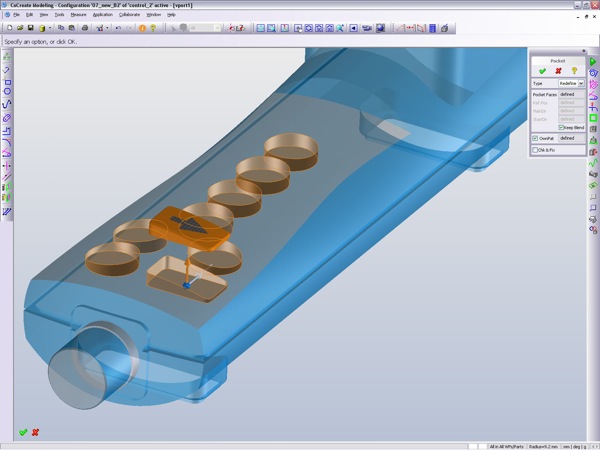
Things all went a little quiet on the CoCreate front while the PTC acquisition worked its way out and through the system, but that’s done with and the company is pushing its latest release. Today saw the announcement of CoCreate 2008. You’ll notice that the hideous OneSpace Designer Modelling nonsense naming has been dropped. What we’re now dealing with is CoCreate Modelling and CoCreate Model Manager: a much clearer naming convention. What’s also interesting is that the press release mentions “incremental enhancements” that peaked my curiousity so I took a closer look. Updates for this release after the jump:

A) Improved and reworked pattern, that guides the user through the process of creating a pattern features, but also gives you better options for non-uniform patterns and selective suppression of specific instances.
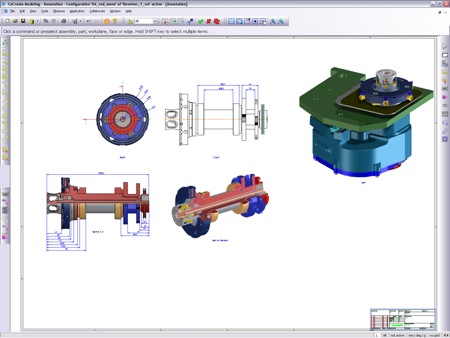
B) Shaded and rendered drawing views

C) You can now capture work-in-progress and this is an interesting one. By allowing the user to save daily work and “what if” scenarios, even when you have multiple revisions of locked parts and assemblies loaded into your session. This type of thing will save that, end of day – “Who the eff locked out my parts, I want to go home?” problem that many PDM users will be familiar with.

Modelling updates
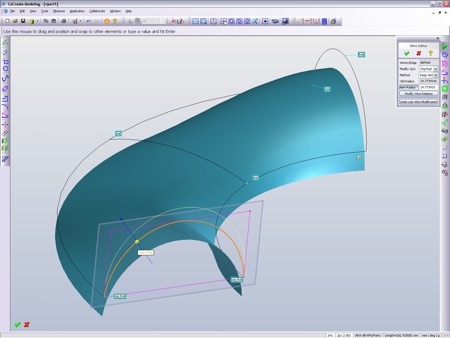
With the recent interest in Direct Editing, Explicit Modelling, Push me Pull me modelling technology, its also no wonder that PTC are making some noise (if a little subdued) about the modelling tools in CoCreate. This release sees some enhancements made to cross-sectional modification and there’s some new surface editing, which allow you to maintain curvature tangency, coincidence, and continuity.

Considering the noise that Siemens are going to make this week with the dual-headed launch of Solid Edge and NX with Synchronous Technology, this release is perfect timing. CoCreate 2008 is scheduled to be available in May 2008 in English, French, German, Italian, Japanese and Spanish.


Add comment (2 comments)

Autodesk to acquire MoldFlow

Published 02 May 2008

Posted by Al Dean

Article tagged with: simulation, solidworks, autodesk, cocreate, moldflow, manufacturing, mergers, aqcuisitions

News of Autodesk’s intent to acquire MoldFlow came as a bit of a surprise. Considering Autodesk’s Digital Prototyping plan over the next few years, to enable users to take a product from concept to manfuacture without too much in the way of physical prototypes, the move makes perfect sense - but how?

The answer is that if you look at what Autodesk are openly (to the media anyway) about in terms of current developments - such as Mould and Die design tools currently on test in China, its establishment of the ‘Computers in Manufacturing’ group (headed up by people instrumental in the development of IronCAD and CoCreate’s SolidDesigner/OneSpace modelling tool), the demonstrations of Functional Design tools developed in partnership with Attilo Rimoldi of ImpactXoft fame), then the ability to simulate the injection moulding process is a missing piece.

What’s perhaps interesting and won’t become clear is how this will effect MoldFlow’s work with other vendors. MoldFlow technology is built into SolidWorks (MoldflowXpress), CoCreate, and many others. There is also a huge range of MoldFlow products that are not quite so well known, but provide a huge arsenal that covers everything ‘injection moulding’ related.

The deal is expected to go through in the second quarter of 2008, so stay tuned.

Add comment (1 comment)

Download a FREE*
pdf of DEVELOP3D

* Registration required

FREE Subscriptions

Click here to register for your
free copy of DEVELOP3D

For advertisers, click here to explore our brand new media pack for 2009.

Back to top