
A couple of weeks ago, Autodesk launched its latest labs experiment for the Inventor community, entitled Project Krypton with the goal of giving “Get real-time feedback on a plastic part design’s manufacturability, cost efficiency, and environmental impact.” What this appears to boil down to is the collection of a number of technologies from the Moldflow acquisition and the beginning of integrating some of the more esoteric features and functions from that product stack (those which perhaps lie outside of the immediately obvious use of Moldflow) and applying them in new and novel ways. The name gives away another of the interesting points, with as all us comic book geeks know, Kryptonite is the chink in Superman’s armour – the link being that the set of tools are available for both Inventor and SolidWorks. I took a while to play with the tool and had a quick chat with the development team behind the product, so here my thoughts.
Once you’ve got it downloaded and installed (it works with the 2010 releases of both Inventor and SolidWorks) and start a new part, you’ll notice three small dials to the bottom left of your screen. From left to right, these represent Manufacturability, Cost Efficiency and Environment Impact of the Material. As you start to design a plastic part, you’ll notice that these dials update in real time to give you an indication of how the part is performing against a number of checks within each category. As you build the part, the dials change (they all too briefly also display a vector for improvement or deterioration of the results. Should the tool find serious problems, it’ll flag up with a warning triangle and give you more information. Let’s explore what each does.
For manufacturability:
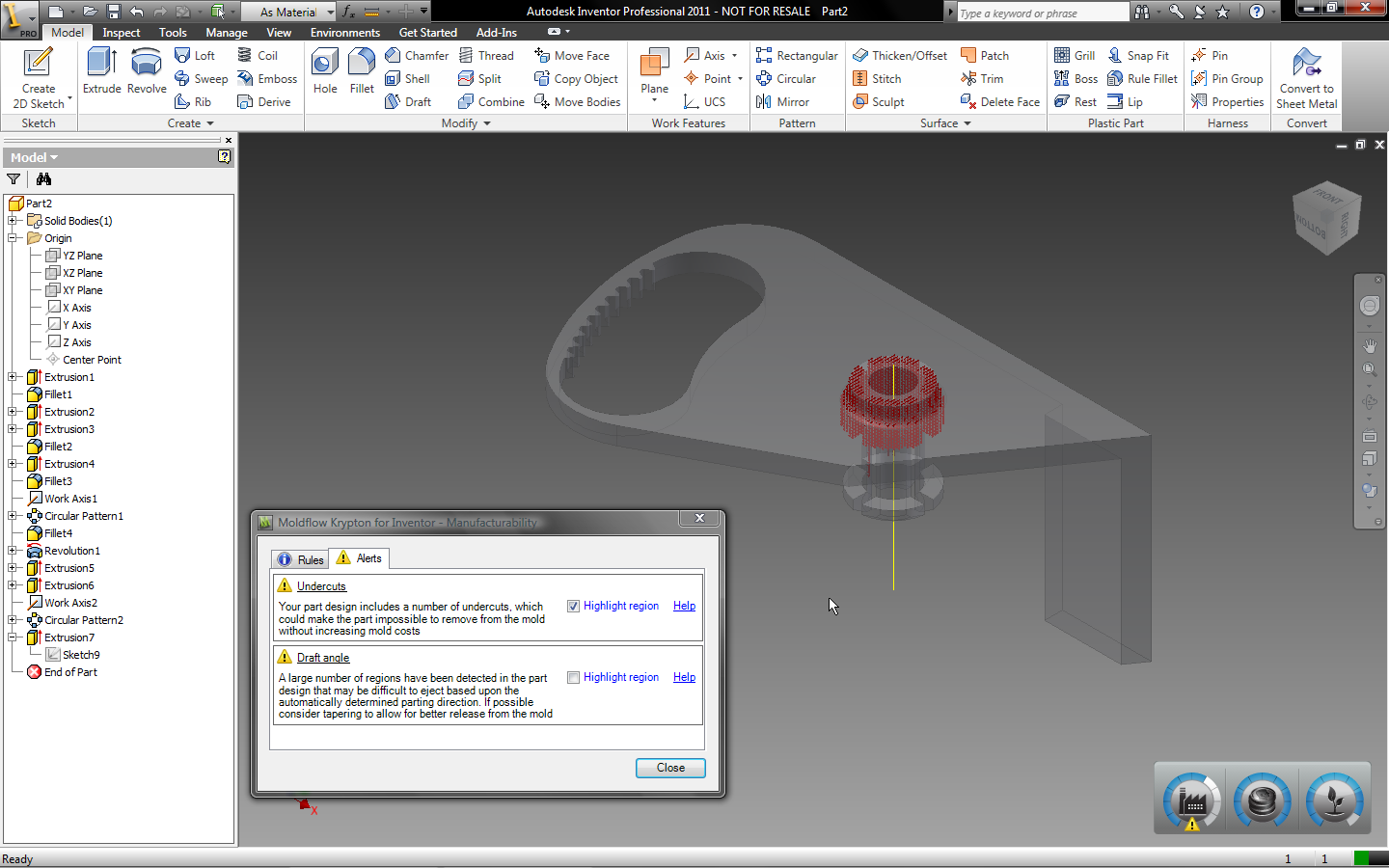
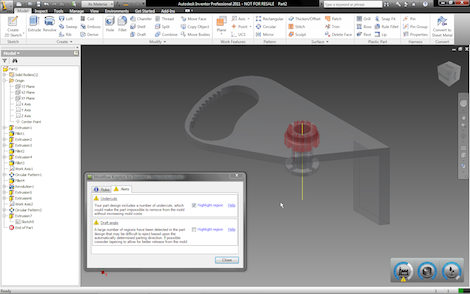
Basically, this is running a draft angle and under cut analysis on the part. With each rebuild of the part, the system is performing an analysis of the part, finding the most appropriate direction of pull and basing the calculations of the basis of that. As soon as you build in something that matches these features, it’ll flag and give you a list of the errors. As you can see below, the system also includes a visualisation option, so the model greys back and the undercuts or non-drafted faces are presented in red.
Krypton tools inside Inventor, giving manufacturability feedback in terms of undercuts – faces shown in red
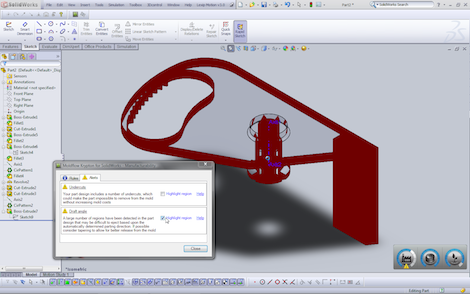
Krypton tools inside SolidWorks this time, giving manufacturability feedback in terms of faces without Draft shown in red
Cost efficiency:
This looks at a couple of things – namely, the size of the part (with the system working on the principles of a small, medium and large moulding machine – bigger machine, more cost) and the complexity of the part – will the tooling (remember, this is for plastic part design only) required complex features, such as slides, lifters and other actions to create the geometry you’ve designed. Add more complex features, the cost efficiency dial winds up.
Environmental impact of material
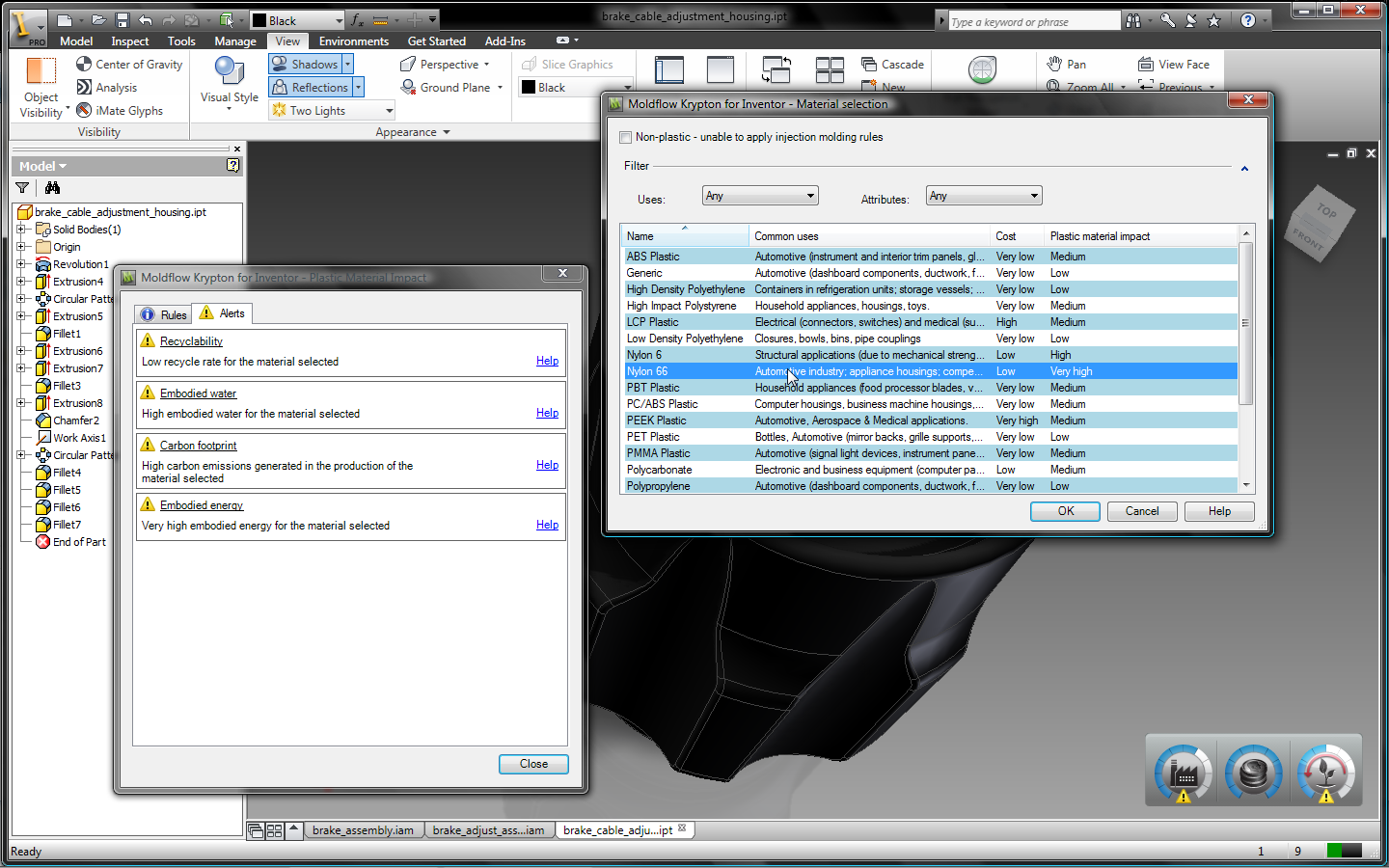
This dial refers to the material choice. If you’ve chosen a material already from Inventor, then the system looks for a match with its own materials database. That database has a high-level group of commonly used plastics – ABS, Nylons, PEs,PEEK, PET and a few variants of Polycarbonate.
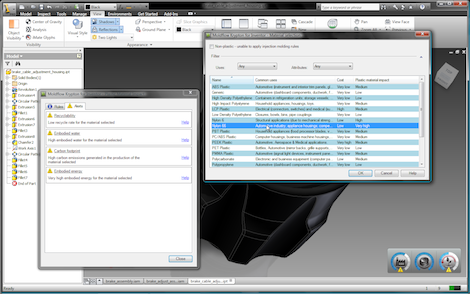
Part within Inventor designed with Nylon 66 in mind – Krypton shows this has a high environmental impact – meaning other materials could be explored
If a match isn’t found or you want to play with the materials, a right click on the appropriate dial and a selection of Select Material brings up a dialog from which you can choose a new material. The choice is quite limited (moreso than purely “limited to plastics”) and its seperate from the Inventor Materials database (which is now quite extensive). This Krypton specific dataset contains information about cost (which is also used in the cost effiiciency calculations), recyclability, embodied water (how much H20 is used in its use), carbon footprint as well as data about the embodied water and energy (how much of both are used in the production of the material selected – note: not the production of the part). if you’re interested in the source of the data, its a mix of in-house information (along with the Moldflow aquisition came huge plastics materials knowledge including its own test facilities) and out-sourced data from a number of european sources
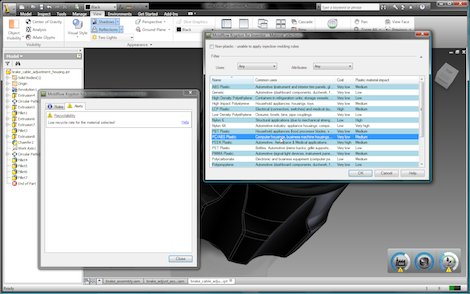
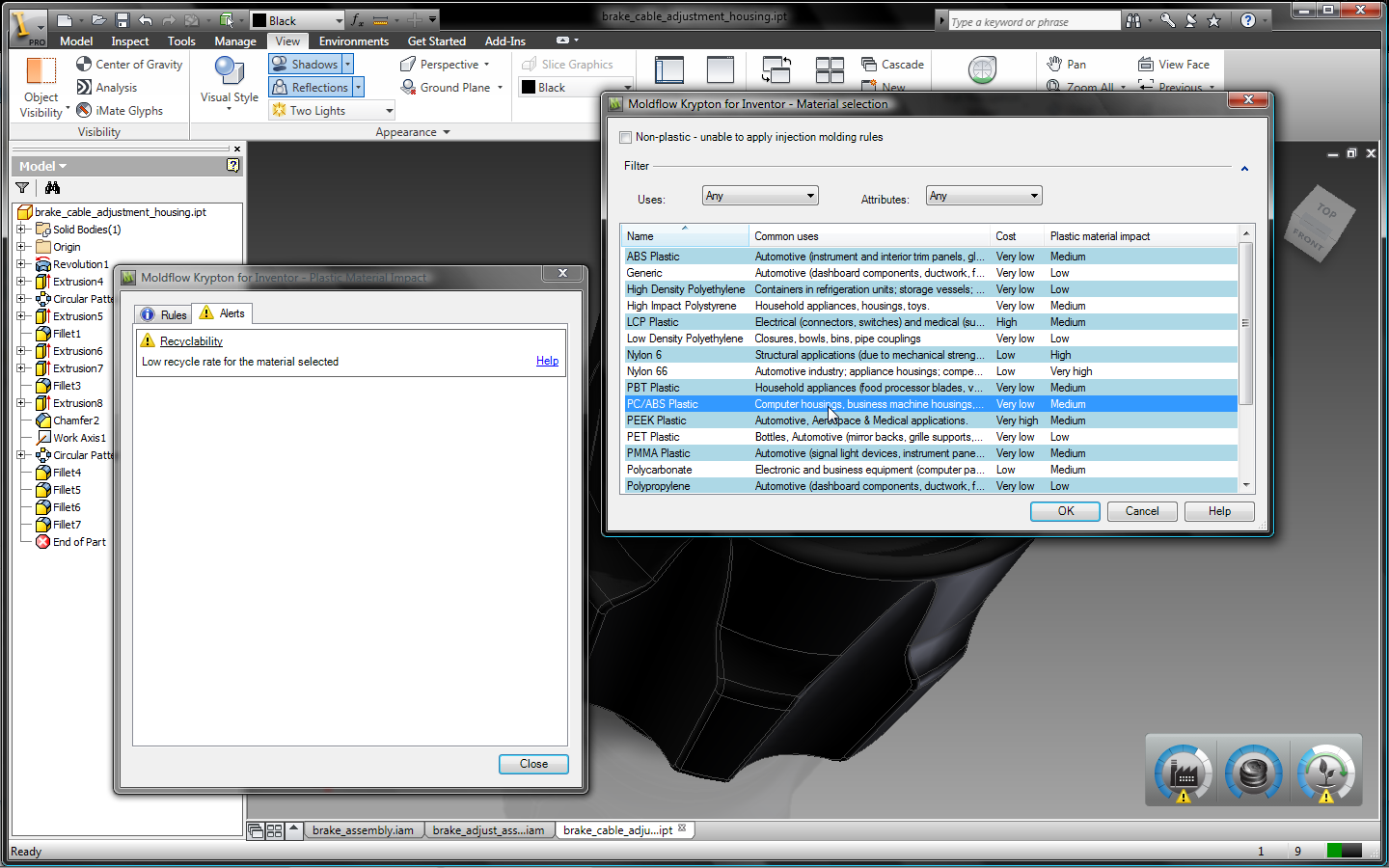
As you can see (and as you’d expect) switching the material to an PC/ABS reduces the Environmental Impact of the Material choice
A few thoughts
I like what Autodesk are trying to do with this and it’s a little unfair to rip apart an early stage demonstration of the software when its not shipping and its not even a formal part of Inventor but…
You expected that, right?
Plastic part design isn’t just about undercuts and draft angles. It’s about getting the functionality correct, being able to manufacture the components in a cost effective manner and ensuring that you balance the complexity of the part against many other factors – whether that’s tooling, whether that’s assembly time and complexity, whether that’s (and this is becoming increasingly important) design for disassembly and recycling/end of life treatment. While I understand the concept behind Krypton, the fact is that its missing much of this information. Does the system include calculations on the offset between having a larger tool with the cost and production rates economics of multiple cavity moulds? Does it look ahead and see that a more complex single part is more cost effective in the total cost of production compared to multiple simple parts which require fasteners or bonding by an assembly line or automation? No. It doesn’t.
If you take a look at the blurb that accompanies the download, you’ll find this nugget:
This instantaneous feedback allows designers to make better decisions earlier in the design process—helping to design plastic parts that can be properly manufactured, are more cost-effective, and produced with a lower environmental impact.
No. it doesn’t. It shows you that there are undercuts and draft angles on a part that’s been through a very quick analysis process. It doesn’t take into account complex parting lines and the requirements of the function of the part. it doesn’t take into account any of the real factors that effect whether the design is successful in terms of design for manufacture aside from some very loose analyses. Will it enable you design better parts? No.
Yes, it’ll show you if your part has an undercut or lacks draft – but Inventor already has these tools and tools which work to greater depth and greater levels of usefulness.
Will it make someone without experience of plastic part design able to design a better plastic part? No. It won’t. Training and experience do that.
So, you might get the impression that I don’t like this move much. In some respects you’d be correct. I’m a believer in appropriate tools for the appropriate task – I don’t believe in over simplification and dumbing down. Can you distill the concepts of design for manufacture, design for assembly/disassembly, knowledge of the injection moulding process, of blow moulding, of rotational moulding, of production economies of scale into a couple of dials that are split into ten segments? No, you can’t.
Yes, the dials might tell you where there’s a problem, but the real skill is in how you solve that problem, how you address it and the decisions you make, you can’t do that based on simple diagnostics of a part with very little user input and you certainly can’t do that on a single part alone. Everything has to be done in context, of the other parts in the production, the performance and function requirements of the part, the material and its working conditions. To do that takes knowledge and experience of the designer or engineer.
What I do think has value is the Environmental Impact indicator – but even this has some flaws at present. of the three areas that this tool works in, this is perhaps the most appropriate for this type of presentation and simplification. That said, you can’t simply switch material from say Nylon to ABS to achieve better environmental impact – the two materials are dramatically different. Again, anyone with plastics design knowledge will know that and will be aware of the fact that Nylon 66 is much less recyclable that ABS and has dramatically different mechanical and thermal properties.
So, who are Autodesk aiming this type of technology at? Are they aiming it at the plastics experienced designer/engineer? I suspect not. Anyone with even the most cursory knowledge of the field has more knowledge and would gain little from its use. So, are they aiming at the designer or engineer unexperienced with plastics design and manufacturing? Probably. Which raises a pretty fundamental question – should they be designing plastics parts in the first place? I understand that everyone needs to start somewhere, but time spent reading a good solid textbook, reading many of the design guides that the plastics’ vendors produce or attending a course at a local college, would be time better spent and prove much more valuable, as the feedback that the tools in Project Krypton give you aren’t really going to help. They’ll tell you there’s a problem. What they don’t do is help you solve it. To my mind, that’s technology for technology’s sake.
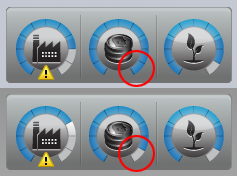
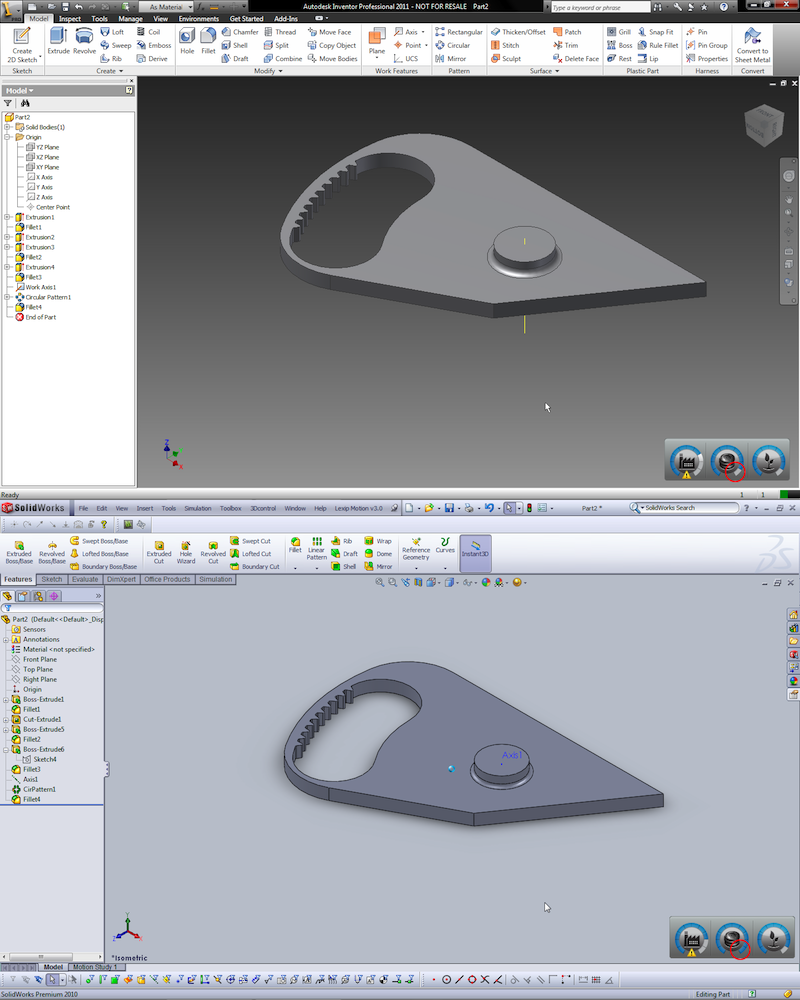
There’s a weird glitch half way through modelling the same part in both SolidWorks and Inventor – as you can see the Cost Efficiency indicator is different between the two versions – according to the Labs development team, this is to be expected.
As for why its been released for both Inventor and SolidWorks, that’s an intriguing move. Autodesk and Dassault are pretty bitter rivals in the mainstream space and the Autodesk team have set themselves on the task of not only taking on SolidWorks, but also Catia in the high-end. I asked about the SolidWorks version and got something along the lines of this – “Let’s look at the existing Moldflow customer base and prospective customers where plastics are heavily used – that leads us to SolidWorks. If we acknowledge where plastics parts are being design and used, then it’s SolidWorks.”
That’s a fair point, but theyre also missing Pro/Engineer off the list. Pro/E is still massive in the consumer product design world, so if Autodesk are going after that market, then they need to be in there too – and I’d be surprised if we didn’t a version of this for Pro/E at some point soon. But this brings me back to my previous points. Those already engaged in product design and engineering have a wealth of knowledge already and I question whether having the tools in Project Krypton would entice them to look at Inventor and Autodesk more favourably as a provider of serious technology that can help them in their daily tasks.
You tell me?